
Streamly 0.13.77 has arrived with an important fix for one of the most frustrating problems an IPTV player can have: seeking to a new position but not actually resuming playback from the selected point.
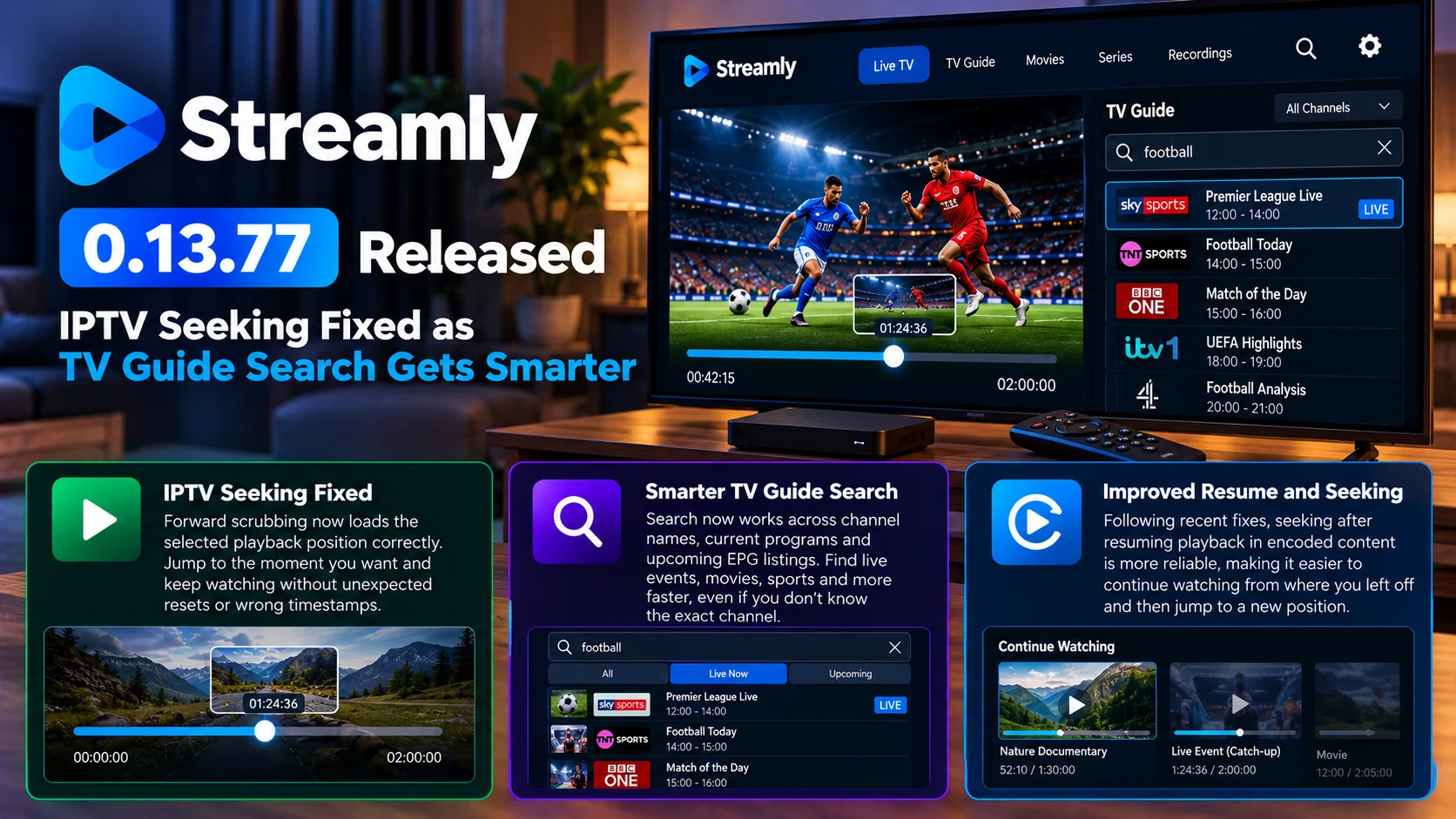
The latest release corrects forward scrubbing so that selecting a different position in supported content now loads the requested playback location correctly instead of behaving as though the seek operation never fully completed.
That fix follows two closely related Streamly updates that have been improving both playback and content discovery. Streamly 0.13.76 expanded TV Guide search beyond simple channel-name matching, allowing searches to surface information from current and upcoming EPG programs. Streamly 0.13.75 also addressed a seek-after-resume problem affecting encoded content.
Together, these updates represent a useful refinement of Streamly’s IPTV experience.
The player is not receiving a massive visual redesign or a completely new playback engine. Instead, Streamly is fixing the smaller interactions that determine whether an IPTV application actually feels dependable in daily use: jumping through recorded or time-shifted content, resuming streams correctly, and finding something in a crowded TV guide without manually checking channel after channel.

Streamly 0.13.77 at a Glance
| Area | What Changed | Why It Matteres |
|---|---|---|
| Seeking | Forward scrubbing now loads the selected position correctly | Makes navigation through seekable IPTV content more reliable |
| Playback position | Requested seek point is respected | Reduces unexpected jumps or playback from the wrong location |
| TV Guide search | Search extends beyond channel names | Makes EPG discovery more useful |
| Current programs | Active EPG programs can contribute to search results | Helps users find what is airing now |
| Upcoming programs | Future EPG listings can be searched | Makes scheduled content easier to discover |
| Resume behavior | Recent update fixed seek-after-resume problems in encoded content | Improves continuity after returning to playback |
| IPTV usability | Several related playback and discovery fixes delivered close together | Creates a more polished everyday viewing experience |
Seeking Is One of the Most Important IPTV Player Controls
Seeking sounds like a basic media-player feature. Move the playback bar forward, release it, and continue watching from that point. In practice, IPTV environments can make this much more complicated.
A standard local video file usually has a predictable beginning, duration, and seekable timeline. An IPTV stream may instead come from a live source, catch-up service, recording system, time-shift buffer, or server-generated stream.
The player therefore needs to understand whether seeking is available, which positions can actually be requested, and how the server expects the new playback point to be communicated.
A user may drag the timeline forward successfully from the interface perspective while the underlying player continues requesting data from the old position.
That creates exactly the kind of problem Streamly 0.13.77 is designed to correct. The visible control and the actual media pipeline now behave more consistently.
What the Streamly 0.13.77 Seeking Fix Changes
The key improvement is that forward scrubbing now loads the selected playback position correctly. Consider a viewer watching a long sports replay.
The user does not want to watch the entire pre-match presentation and moves the playback slider twenty minutes forward. The expected behavior is simple: playback should restart from around the selected twenty-minute point.
When seeking is broken, several things can happen. The interface may show the new position, but the stream resumes near the old one.
Playback may jump somewhere unexpected. The loading indicator may appear without the player properly switching to the new segment. In worse cases, playback may appear stuck.
Streamly 0.13.77 addresses the path between choosing the new position and actually loading media from that position. That makes seeking feel like a dependable playback action rather than an uncertain request.
Why Forward Seeking Can Be Difficult in IPTV
IPTV players rarely control the entire streaming chain. They depend on a provider’s media server, playlist information, EPG system, and the actual transport format used for playback.
A seekable stream may be divided into many small segments. To move forward, the player has to determine which segment corresponds to the requested time and then request the correct media.
Encoded content can add another layer of complexity because the player may not be able to resume on every individual frame.
Video usually needs an appropriate decoding point, often around a keyframe.
That means a request for an exact timestamp may need to be mapped onto the nearest valid playback location.
The player then has to synchronize video and audio again before continuing.
A bug anywhere in that process can create the impression that the system's control itself is broken.
Streamly’s recent sequence of fixes suggests the project has been concentrating on exactly these playback-state transitions.
Streamly 0.13.75: Already Addressed Resume and Seeking
Version 0.13.77 is not an isolated playback fix.
The earlier 0.13.75 release addressed a problem involving seeking after playback had been resumed in encoded content.
Resume behavior introduces another layer of player state.
Imagine watching a program, leaving it halfway through and later reopening it.
Streamly needs to remember where playback stopped and restore the stream at that position.
If the user then immediately seeks somewhere else, the player must replace the restored timestamp with the new requested timestamp.
A player can become confused if both states remain active at once.
The resume position may override the user’s seek request, or internal buffering may still be based on the old location.
Fixing seek-after-resume behavior helps ensure that once a viewer manually selects a new point, that choice becomes the active playback position.
TV Guide Search Becomes Much More Useful
While 0.13.77 focuses on playback, Streamly’s recent 0.13.76 update improved a completely different part of the IPTV experience: TV Guide search.
Traditional IPTV search can be surprisingly limited.
If a user types “football,” a channel-name-only search may return nothing unless a channel literally contains the word football in its name.
That is not how viewers think about television.
They usually remember the program, match, movie, or event they want to watch—not necessarily the channel carrying it.
Streamly’s smarter search expands the information that can be considered.
Search can now work with channel names as well as current and upcoming EPG program information.
That changes the TV Guide from a passive grid into a more useful discovery tool.
Searching Current Programs Makes Live TV Easier to Navigate
Imagine an IPTV playlist containing hundreds of channels.
Scrolling through the full list to find a specific live event can be tedious.
With current-program search, the user can search for the event itself.
If the EPG data contains the relevant program title, Streamly can use that information to surface the appropriate channel.
This is especially useful for sports.
A user may know the name of a match but not which network or regional channel is showing it.
The same applies to movies, news programs, documentaries, and special broadcasts.
Instead of treating the channel list as the only searchable database, Streamly can use the program schedule as part of discovery.
That is much closer to how modern streaming services behave.
Upcoming EPG Search Adds Planning to the Guide
Searching upcoming programs is arguably even more useful.
A viewer may want to know whether a movie will be shown later in the evening or whether a sporting event appears on any available channel.
Without EPG search, the user might have to open multiple channels and inspect their schedules manually.
With upcoming-program matching, the guide can help answer that question directly.
This gives Streamly’s search two roles.
It can help users find what is available now, and it can help them discover what will be available later.
For IPTV users with large provider playlists, that can dramatically reduce the amount of manual browsing required.
Better Search Depends on Good EPG Data
There is an important limitation.
The Smart TV Guide search is only as useful as the Electronic Program Guide behind it.
If an IPTV provider supplies accurate program names and schedules, Streamly can use that metadata effectively.
If the EPG is missing, delayed, or incorrectly mapped to channels, search results will naturally be less complete.
This is not a Streamly-specific limitation.
Any television application relying on EPG metadata faces the same problem.
The improvement in Streamly is that when useful metadata is available, the player can do more with it.
That makes high-quality EPG information increasingly important to the complete viewing experience.
Search and Playback Fixes Solve Two Different IPTV Problems
The recent releases address two very different stages of watching television.
First comes discovery.
The user needs to find the right channel or program.
Streamly 0.13.76 improves that process through smarter EPG search.
Then comes playback.
Once the user is watching something, the player needs to respond correctly to resume, seek, and navigation actions.
Versions 0.13.75 and 0.13.77 improve that stage.
Together, the updates create a more complete improvement than any individual changelog entry might suggest.
A faster search feature has limited value if playback controls remain unreliable.
A perfect playback engine can still be frustrating if users cannot efficiently find what they want to watch.
Streamly is improving both.
IPTV Players Need More Than Basic Live Playback
The modern IPTV player is becoming more sophisticated.
Simply opening an M3U playlist and playing a channel is no longer enough for many users.
Viewers increasingly expect TV Guide data, search, catch-up support, resume positions, seekable playback, favorites, and a polished interface.
Those expectations are influenced by mainstream streaming services.
People have become accustomed to searching directly for programs and continuing playback where they left off.
IPTV applications therefore have to bridge two different experiences: traditional channel-based television and modern on-demand streaming.
Streamly’s latest changes reflect that transition.
The TV Guide remains central, but search makes it behave more like a content catalogue.
Playback remains stream-based, but resume and seeking make it behave more like an on-demand player.
Why Small Playback Fixes Matter More Than New Features
Media player changelogs often attract attention when they add a new codec, platform or interface.
Reliability fixes can be more valuable.
A viewer may use seeking every day.
If the control works only some of the time, confidence in the entire player drops quickly.
The same is true for resume.
Users expect playback position to behave predictably without understanding how it is stored internally.
A mature media application should hide that complexity.
The best result of Streamly 0.13.77 is therefore not that users receive a visibly new feature.
It is that one of the existing features behaves more like users always expected it to.
What Streamly Users Should Test
Users moving to 0.13.77 should pay particular attention to seekable content.
Try moving forward by different amounts rather than testing only one small jump.
Resume a previously watched item and then seek again.
If the IPTV provider supports catch-up or recorded programs, test those streams as well.
For search, try both channel names and program names.
Testing a currently airing event and a future EPG listing can confirm whether the newer TV Guide discovery behavior is working with the provider’s metadata.
These real-world tests are more useful than judging the release only by whether a stream starts successfully.
Streamly’s Update Strategy Is Worth Watching
Versions 0.13.75, 0.13.76 and 0.13.77 form a useful pattern.
Instead of waiting for one large version jump, Streamly has been releasing targeted fixes quickly.
One update corrects seek-after-resume behavior.
Another improves TV Guide search.
The next corrects forward scrubbing.
For users, frequent small releases can mean quicker fixes when a playback regression is identified.
The trade-off is that users need to keep the player reasonably current if they want the latest reliability improvements.
For an IPTV application, that can be worthwhile because provider formats and playback edge cases can vary significantly.
Final Thoughts
Streamly 0.13.77 is a small release with an important playback improvement.
Forward seeking is a basic expectation in any seekable video experience, and the player now handles the selected playback position more reliably.
Combined with the earlier seek-after-resume correction, Streamly is strengthening an area that can easily make IPTV playback feel unpredictable when it does not work correctly.
The smarter TV Guide search introduced alongside these playback improvements may ultimately be just as useful.
Searching channel names is no longer enough for increasingly large IPTV lineups.
Allowing current and upcoming EPG programs to participate in search makes the guide behave more like a true content-discovery system.
That is the bigger story behind the recent Streamly releases.
The application is gradually improving both sides of television viewing: finding the program and controlling the playback once it starts.
For IPTV users managing large channel lists, catch-up content and complex EPG schedules, those refinements can matter far more than another cosmetic interface change.
FAQs About Streamly 0.13.77
1) What is new in Streamly 0.13.77?
The main change fixes forward seeking so that selecting a new position in supported IPTV content correctly loads that playback point.
2) What was wrong with seeking before?
Users could scrub forward but the player did not always load the selected playback position correctly.
3) Did Streamly improve TV Guide search?
Yes. A recent update expanded search beyond channel names to include current and upcoming EPG program information.
4) Can I search for a program instead of a channel?
When the IPTV provider supplies suitable EPG metadata, Streamly can use program information as part of TV Guide search.
5) Can Streamly search upcoming programs?
The newer TV Guide search behavior includes upcoming EPG listings, making future programming easier to discover.
6) What changed in Streamly 0.13.75?
That release addressed a seek-after-resume issue affecting encoded content.
7) Why are seeking and resume complicated in IPTV players?
The player may need to work with segmented streams, server-side time positions, encoded keyframes and previously stored playback state.
8) Will smarter search work without EPG data?
Its usefulness depends on the metadata supplied by the IPTV provider. Channel search can still work independently, but current and upcoming program discovery requires usable EPG information.
Stay Updated with the Player SDK Guide Hub
Modern IPTV players depend on accurate seeking, playback-state recovery, EPG metadata, live-stream handling and fast content discovery.
The Player SDK Guide Hub tracks developments across Streamly, IPTV players, Android TV, Fire TV, Roku, Apple TV, Plex, Jellyfin, Kodi, VLC, Media3 and other video-player ecosystems.
We cover player releases, playback fixes, TV Guide improvements, streaming-device changes and platform updates to explain what changed, why it matters and what users and streaming teams should test next.
Explore the Player SDK Guide Hub for the latest IPTV, video-player and streaming-platform updates.
