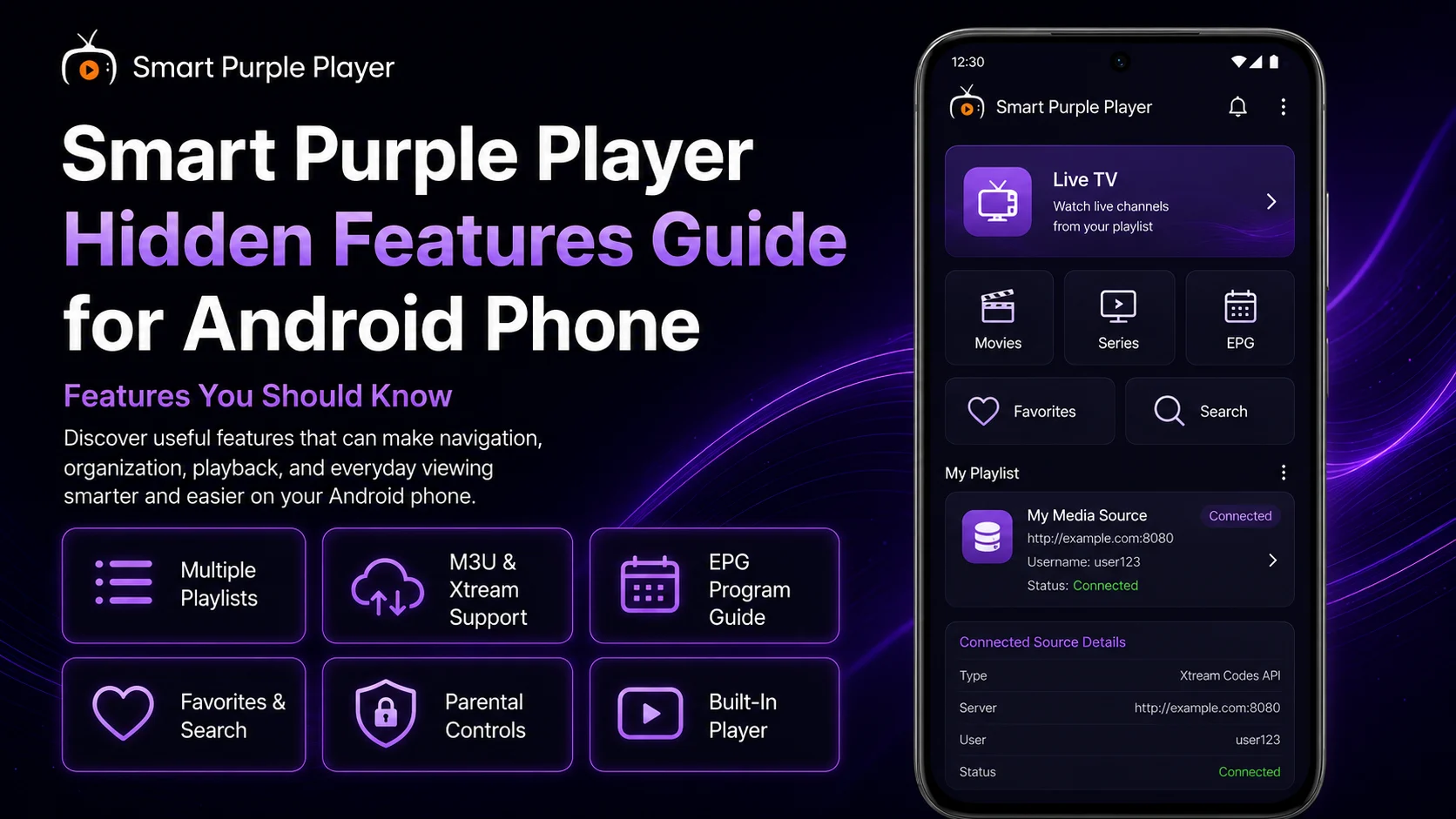
Once you've installed, configured, and learned how to use Smart Purple Player on your Android phone, you may think you've already discovered everything the application has to offer. However, several useful capabilities can easily be overlooked when you mainly use the player to open a playlist and start watching.The Smart Purple Player supports M3U playlists and Xtream-based sources and provides features such as playlist management, EPG support, favorites, search, parental controls, and a built-in media player for SD, HD, and supported 4K playback. Some of these features become much more useful when you understand how they work together.The player itself does not provide pre-loaded channels or subscriptions. Instead, it works with compatible sources that you provide and are authorized to access. As a result, some features and information available inside Purple Player can vary depending on your playlist or service.This complete Smart Purple Player Hidden Features Guide for Android Phone explores useful features, controls, and capabilities that users may miss during normal viewing.
Why Explore Smart Purple Player Hidden Features?
Most users develop a simple routine after completing the initial setup: open Purple Player, choose Live TV, select a channel, and start watching.That works perfectly well, but it doesn't take advantage of everything available within the player.Learning more about playlist management, EPG information, favorites, search, parental controls, and source behavior can make larger libraries significantly easier to manage.It can also help with troubleshooting.Once you understand which information comes from Purple Player and which information comes from your source, it's much easier to determine why a particular channel, EPG entry, movie, or playlist behaves differently.
Purple Player Features Worth Exploring
| Feature | Why it's Useful | |
|---|---|---|
| Multiple Playlist Management | Manage compatible sources separately | |
| M3U & Xtream Support | Provides flexible source connection options | |
| EPG Program Guide | Displays available live TV schedule information | |
| Favorites | Creates quicker access to preferred content | |
| Search | Helps navigate large libraries | |
| Parental Control | Restricts selected content | |
| Built-In Player | Handles SD, HD, and supported 4K playback | |
| Source-Based Organization | Adapts the library to available source information |
Hidden Feature 1: Multiple Playlist Management
One of the most useful Purple Player capabilities is the ability to manage compatible sources rather than being limited to a single playlist.If you have more than one authorized M3U or Xtream source, playlist management can help you keep them separated.Give each source a clear name so you immediately know which account or library you're browsing.Multiple playlists can also be useful for troubleshooting. If one source suddenly fails while another continues to load and play normally, you've gained valuable information: Purple Player itself and your internet connection may still be functioning correctly.Avoid adding unnecessary duplicate playlists, as they can make the interface more difficult to manage.
Hidden Feature 2: M3U and Xtream Give You Different Setup Options
Purple Player's support for both M3U playlists and Xtream-based login details gives users flexibility when connecting compatible sources.If your authorized service supplies an M3U URL, you can use the corresponding playlist method. If it supplies Xtream-style credentials, you can use those instead.This flexibility is useful because services don't always provide connection information in exactly the same format.You shouldn't convert or modify working connection information unnecessarily. Use the method that matches the details supplied by your service.Whichever method you use, protect the information as you would any other private account credentials.
Hidden Feature 3: EPG Is More Than a Channel Schedule
Many beginners notice the Electronic Program Guide (EPG) but don't make it part of their everyday navigation.When compatible data is supplied by your source, EPG can help you see program information associated with supported live TV channels.Instead of opening several channels to determine what's currently playing, you can use available guide information to make a decision first.EPG can therefore act as a navigation tool rather than simply an information screen.Remember that Purple Player displays compatible EPG information associated with the source. Missing or incorrect listings don't automatically mean the application is malfunctioning.
Hidden Feature 4: Favorites Can Become Your Personal Mini-Library
Favorites may look like a basic convenience feature, but they can completely change how you navigate a large source.Imagine that your playlist contains hundreds of channels but you regularly watch only 15.Instead of opening categories and scrolling through the complete library each time, adding those channels to Favorites creates a much smaller personal collection.The key is being selective.Don't turn Favorites into another enormous list. Keep it limited to media you genuinely access frequently.Reviewing the list occasionally helps keep it useful as your viewing habits change.
Hidden Feature 5: Search Can Replace Category Browsing
Search becomes increasingly valuable as your library grows.Large M3U or Xtream sources may contain extensive collections of live channels, movies, and series. Finding one specific item by manually navigating categories can take time.Purple Player's Search feature provides a faster approach when you already know what you're looking for.Try searching with a short, distinctive part of the title rather than an unnecessarily long phrase.The results depend on the names and information supplied by your source, so Search can't locate media that isn't actually present in the connected library.
Hidden Feature 6: Source Organization Changes the Purple Player Experience
One overlooked aspect of Smart Purple Player is that the app can look different depending on the source connected to it.Purple Player provides the interface, but your source may influence the categories, titles, media availability, EPG information, and organization displayed within that interface.One playlist might have neatly organized categories while another uses completely different names.This is why two people using Purple Player can have noticeably different libraries.Understanding this makes it easier to recognize when an organizational issue comes from source data rather than the application itself.
Hidden Feature 7: The Built-In Player Supports Multiple Quality Levels
Purple Player includes a built-in player intended for media playback across SD, HD, and supported 4K quality levels.That doesn't mean every stream will automatically play in 4K.The original source must provide appropriate video quality, your Android phone needs to handle the stream, and your network must deliver the required data consistently.This gives you an important practical option: prioritize smooth playback over the highest available resolution.If 4K constantly buffers but HD works smoothly, HD may provide the better real-world experience.
Hidden Feature 8: Your Network Is Part of the Player Experience
Your internet connection isn't technically a Purple Player feature, but understanding how the application reacts to network conditions unlocks a much better experience.Live streams require continuous data delivery.A network that works perfectly for basic web browsing may still struggle with demanding high-resolution video.If playback becomes unstable, compare several streams and check your network before changing Purple Player settings.Also avoid unnecessary switching between Wi-Fi and mobile data during active playback because reconnecting can interrupt the current stream.
Hidden Feature 9: Parental Controls Can Improve Shared-Device Use
Purple Player's parental control functionality can be particularly useful on Android phones or devices used by more than one household member.Instead of leaving every available category equally accessible, you can use the available restrictions to help protect selected adult or otherwise restricted content.Choose a PIN or access method that isn't easily guessed.For a more complete family setup, combine player-level controls with appropriate Android-level protections.This provides better control than relying on the application alone.
Hidden Feature 10: A Working Second Playlist Is a Troubleshooting Tool
If you have multiple authorized sources configured, a second working playlist isn't just additional content—it can help diagnose problems.Suppose Playlist A suddenly stops loading.Instead of immediately reinstalling Purple Player, switch to Playlist B.If Playlist B loads and plays normally, you've confirmed that the application and Android phone are still capable of streaming.That makes Playlist A, its credentials, or its server the more likely area to investigate.This is a simple but surprisingly powerful troubleshooting technique.
Hidden Feature 11: Individual Streams Work Independently
An playlist may contain hundreds of media entries, but they don't necessarily succeed or fail together.One channel can become unavailable while everything else works.Understanding this prevents one of the most common mistakes: deleting a complete working playlist because of a single failed channel.Whenever one stream stops playing, test several others.If they work, leave your overall configuration alone and check the failed channel again later.
Hidden Feature 12: EPG and Playback Can Work Independently
A channel can play perfectly even when its EPG information is missing.Similarly, an EPG entry may appear even if the associated stream temporarily fails.That's because program information and actual video delivery aren't necessarily the same component.Understanding this separation is extremely useful.If playback works but EPG information doesn't, focus on the guide data rather than changing video settings.If EPG works but a stream doesn't, test other channels and investigate the individual source.
Hidden Feature 13: Android Controls Can Affect Purple Player
Some behavior you experience while using Purple Player can originate from Android rather than the application.Mobile data restrictions, battery-management settings, available storage, Bluetooth audio routing, and other Android-level controls can affect your viewing experience.For example, if you see video but hear no sound, check whether Android is sending audio to connected Bluetooth headphones.If the app works on Wi-Fi but not cellular data, review Android's mobile-data permissions or restrictions.Knowing where Android ends and Purple Player begins makes troubleshooting much faster.
Hidden Feature 14: Large Libraries Need More Loading Time
A playlist with thousands of media entries can naturally take longer to load than a small source.Add movies, series, category information, and EPG data, and the amount of information being processed can increase further.Give large libraries enough time to populate before repeatedly closing the application.Using a stable network during this process can help.A slower initial load isn't automatically evidence that Purple Player is broken.
Hidden Feature 15: Default Settings Are a Troubleshooting Baseline
Default settings are more valuable than they may seem.Once you've connected a playlist and confirmed that normal playback works, you have a stable baseline.If you later experiment with settings and playback becomes worse, comparing the experience with your original configuration can help identify the problem.This is why changing one setting at a time is so useful.You can explore Purple Player without losing track of which adjustment affected your viewing experience.
Hidden Feature 16: Search, Favorites, and EPG Work Best Together
Some of Purple Player's most useful features become even better when combined.Use Search when you know exactly what you want. Use Favorites for content you access repeatedly. Use EPG when you want to explore what's currently available on live TV.Instead of relying on one navigation method for everything, choose the tool that fits the situation.This can dramatically reduce unnecessary scrolling through large libraries.
Hidden Feature 17: Playlist Names Can Improve Troubleshooting
Giving your playlists descriptive names might seem cosmetic, but it becomes valuable when you manage multiple sources.Clear naming helps you immediately identify which source is active when something stops working.You can determine whether a problem affects one playlist or several without guessing which account you're currently testing.Simple organization can therefore make both everyday navigation and technical troubleshooting easier.
Hidden Feature 18: Purple Player Doesn't Control Everything You See
Perhaps the most important hidden concept is understanding how much of the experience comes from outside the player.Purple Player provides the interface, playback environment, playlist tools, search, favorites, parental controls, and EPG presentation.Your source can determine what media is available, how categories are named, whether EPG information exists, and whether individual streams are online.Your network determines how reliably the data reaches the phone.Android provides the device environment.Recognizing these separate layers makes Purple Player much easier to understand.
Best Practices When Exploring Hidden Features
Start with a working configuration before experimenting.Explore Search, Favorites, EPG, playlist management, and parental controls gradually rather than changing everything simultaneously.Keep M3U URLs and Xtream credentials private, and avoid deleting a working source simply to experiment.When testing a new option, use a familiar stream that you already know plays correctly. That gives you a reliable point of comparison.Most importantly, use only services and media you're authorized to access.
Common Mistakes When Exploring Purple Player
A frequent mistake is assuming every available feature will behave identically with every source.EPG information, category organization, search results, and media availability can all depend on the connected source.Another mistake is making too many changes at once.Users may also confuse Android-level behavior with Purple Player settings or treat one failed channel as evidence that the entire playlist has stopped working.Explore features gradually and preserve a configuration that already works.
Why These Hidden Features Matter
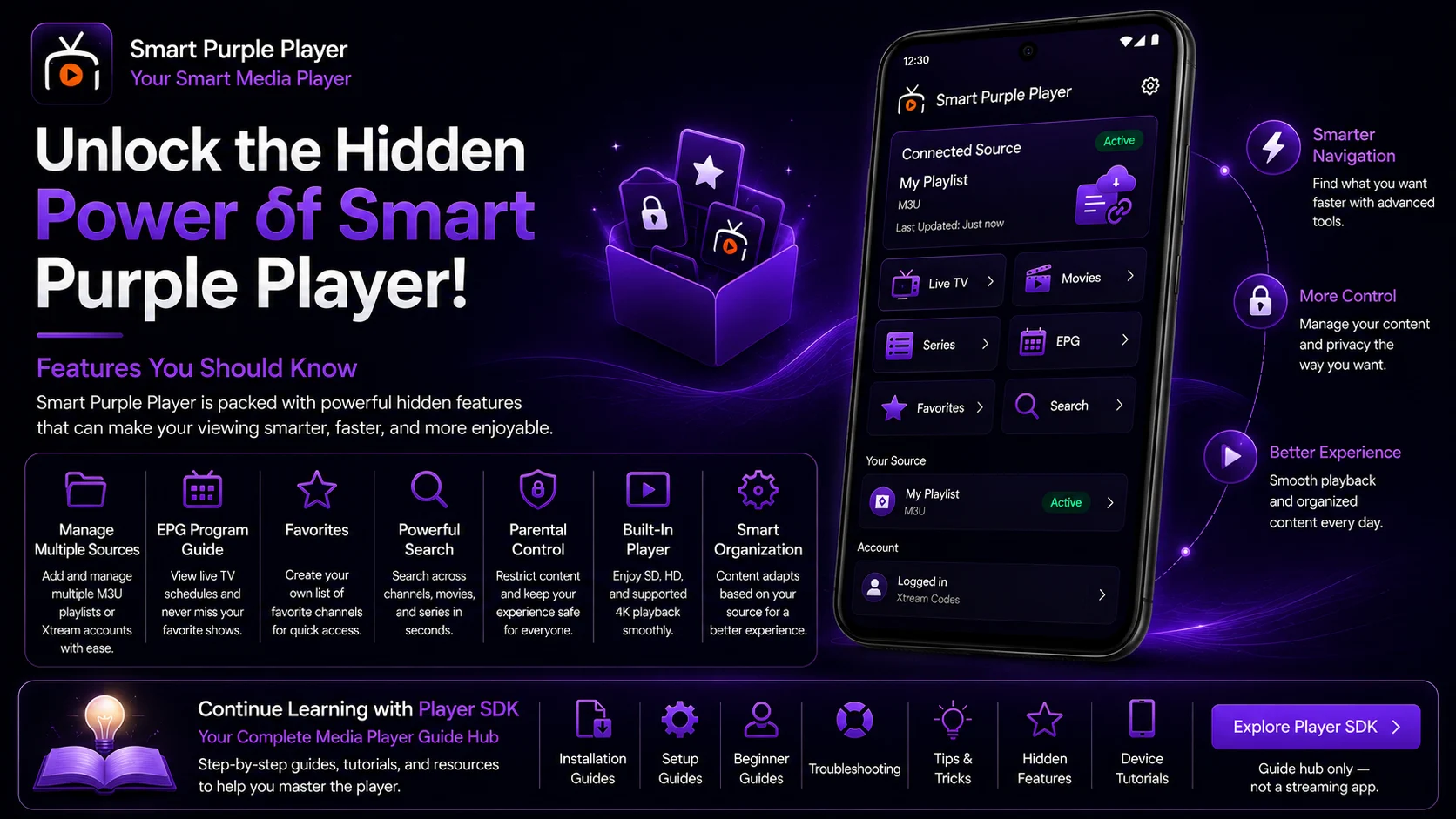
The real value of the Smart Purple Player isn't limited to opening a stream.Playlist management helps organize compatible sources. Search reduces time spent browsing large libraries. Favorites create faster access to preferred content. EPG provides useful live-TV context when compatible data is available, while parental controls can improve shared-device use.The built-in player provides flexible playback across different video quality levels, and understanding source behavior helps you troubleshoot problems much more efficiently.Together, these features make Purple Player a more practical interface for Android users.
Final Thoughts
Exploring the hidden features of the Smart Purple Player on an Android phone can make the application considerably easier to navigate and manage.Use playlist management to keep multiple compatible M3U and Xtream sources organized. Build a focused Favorites list, use Search for large libraries, and take advantage of EPG information when your source provides it.Explore parental controls when the device is shared, and remember that SD, HD, and supported 4K playback still depends on your phone, network, and source quality.Most importantly, understand the relationship between Purple Player, your source, your network, and Android.Once you understand those separate components, both everyday viewing and troubleshooting become much simpler.
Frequently Asked Questions (FAQs)
1) What are the best hidden features in the Smart Purple Player?
Useful capabilities include multiple playlist management, M3U and Xtream support, EPG, favorites, search, parental controls, and the built-in player for SD, HD, and supported 4K media.
2) Can I use multiple playlists in the Smart Purple Player?
Purple Player supports playlist management for compatible sources. Keeping each source clearly named makes switching and troubleshooting easier.
3) What is the benefit of Favorites?
Favorites let you create quicker access to frequently watched content instead of repeatedly browsing your complete library.
4) Why does EPG work for some channels but not others?
Purple Player depends on compatible EPG information associated with your source. Some channels may have complete program information while others have missing or incomplete guide data.
5) Can Purple Player play 4K streams?
The built-in player supports compatible 4K playback alongside SD and HD. Actual performance depends on the stream, the Android device, the internet connection, and the server.
6) Does Purple Player provide content?
No pre-loaded subscription should be expected from the player. You need your own compatible source and should only access media you're authorized to use.
7) How can I get more from the Smart Purple Player?
Combine Search, Favorites, EPG, organized playlists, and appropriate parental controls while keeping your player updated and your network stable.
Continue Learning with Player SDK
Continue exploring Player SDK for more installation guides, setup guides, beginner guides, troubleshooting tutorials, tips & tricks, hidden features, and device-specific media player resources.Use these guides to keep your media players organized, understand their features, solve common playback problems, and create a smoother viewing experience across your supported devices.
