
Plex’s redesigned Apple TV experience has changed much more than the appearance of the application. For long-time tvOS users, one of the most noticeable differences is the disappearance of the familiar swipe-down information panel during playback.
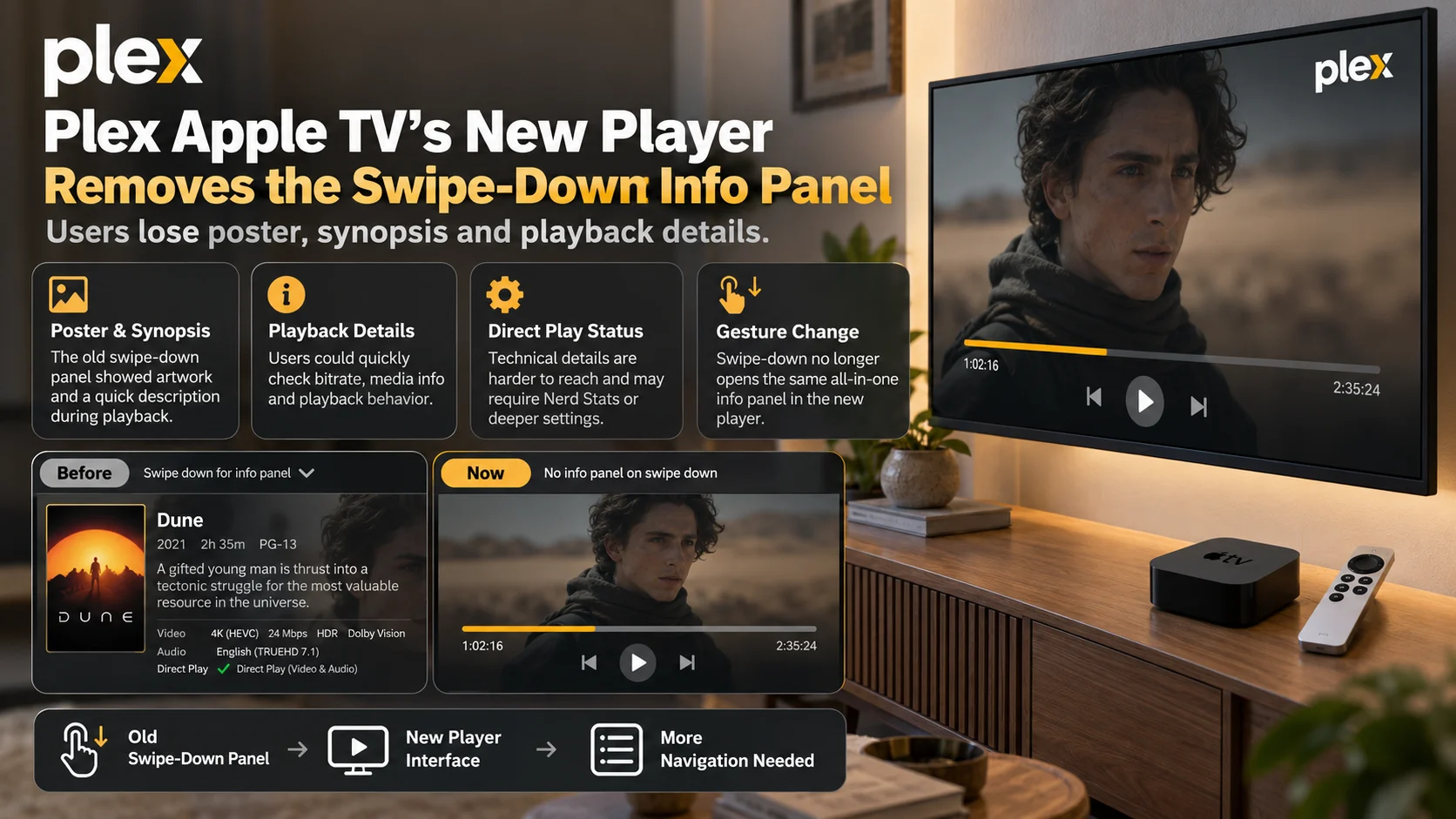
In the previous Plex Apple TV player, users could swipe down on the Apple TV remote while a movie or episode was playing and quickly bring up information related to the current title.
Depending on the content and player state, that interface provided convenient access to the poster, synopsis, and useful playback information without requiring viewers to stop the video or leave the player.
Following the rollout of Plex’s redesigned Apple TV experience, users say that workflow is gone.
Instead, the new player presents a redesigned set of playback controls and menus. Some technical information can still be found elsewhere, including through Plex’s Nerd Statistics feature, but users say the old combination of content information and playback details in one easily accessible panel has disappeared.
The change is receiving particular attention from long-time Apple TV users because it affects a feature that was frequently used while a movie or television episode was already playing.

Plex announced on September 17, 2026, that its newly redesigned experience had started rolling out on tvOS.
The rollout replaces the older Plex Apple TV application experience, with version 2026.18.0 appearing in multiple recent user reports.
Plex’s September release announcement describes the application as a “reimagined and redesigned Plex experience.” The company's broader 2026.18.0 release notes also state that updates are gradually distributed to users over multiple days rather than becoming available to everyone simultaneously.
That explains why some Apple TV households may have encountered the redesigned interface earlier than others.
The new experience changes navigation, library presentation, and player controls. However, one of the changes attracting significant discussion is not a newly added feature but a familiar interface that users can no longer find.
What Happened to the Plex Swipe-Down Info Panel?
On the older Plex Apple TV app, swiping down while content was playing opened an information overlay.
Users could quickly check what they were watching without backing out of playback.
A Plex forum report from September 23 describes the previous workflow as allowing the viewer to swipe down and see the current movie or episode’s poster and synopsis.
After upgrading to the new application, the user reported that only a more limited set of playback controls was available and specifically requested that Plex restore the in-player information panel. The report was made using Plex Player version 2026.18.0 on an Apple TV 4K.
Other users have independently reported the same behavioral change.
A separate Plex discussion says that the previous interface provided the current video's summary alongside other relevant controls after a simple swipe-down gesture. In the redesigned application, the user said that information was no longer available through the same interaction.
The result is not simply a different visual design.
It changes how quickly viewers can obtain context about the content they are already watching.
What Information Did Users Access From the Old Panel?
The old playback panel served two related purposes.
First, it provided editorial information about the media itself.
If someone joined halfway through a movie and asked what was playing, the viewer could quickly display the title, artwork, and synopsis without stopping playback.
Second, experienced Plex users relied on the panel for technical playback information.
Community reports describe using the old interface to determine details such as the bitrate and whether Plex was directly playing or transcoding a stream.
That made the same gesture useful both to casual viewers and users troubleshooting their Plex setup.
| A | B | C |
|---|---|---|
| Information or Control | Previous Apple TV Experience | New Player Experience |
| Movie or episode synopsis | Available from the playback information panel | Users report it is no longer available through the old swipe-down workflow |
| Poster / artwork | Could be viewed alongside playback information | Users report it is missing from the redesigned playback information experience |
| Basic media details | Quickly accessible during playback | Some information now requires deeper navigation |
| Direct Play / transcode status | Users could quickly inspect playback behavior | Technical information can be accessed through options such as Nerd Statistics, but not through the same simplified panel |
| Audio and subtitles | Accessible alongside other playback options | Moved into the redesigned playback menus |
| Chapters / seeking | Part of the previous player navigation | Swipe and navigation behavior has changed in the new player |
The exact information visible can vary depending on media and application state, but recent discussions consistently describe a reduction in the amount of contextual information immediately available during playback.
Poster and Synopsis Removal Changes a Simple Living-Room Workflow
The disappearance of the synopsis may sound minor compared with codec compatibility, HDR, or playback errors, but it solves a common living-room problem.
Someone begins watching a movie.
Another person enters the room and asks, “What is this about?”
Previously, the Plex user could bring up the information overlay while allowing playback to continue.
There was no need to return to the movie's detail page and then restart or resume playback.
A recent Plex forum user described exactly this use case, explaining that the old app made it possible to show someone the current title's information without leaving the video. The same user stressed that technical statistics are not a replacement for a synopsis.
That distinction is important.
Nerd Statistics can help diagnose video playback, but it cannot replace information about the story, year, artwork, or context of the movie or episode itself.
Direct Play and Transcoding Information Is Harder to Reach
For advanced Plex users, the old panel was also a diagnostic shortcut.
Plex playback can operate through Direct Play, Direct Stream, or transcoding, and knowing which mode is active can be useful when investigating buffering, quality changes, or unexpectedly high server usage.
Users say the previous Apple TV interface made checking this information much faster.
One Plex forum report specifically asks for the old pull-down interface to return because it previously made file information, playback behavior, and Direct Play status readily accessible. The user says the redesigned interface requires navigating through more menus to obtain similar technical information.
Reddit users have expressed similar concerns, with several saying they regularly used the old information panel to check bitrate and determine whether a stream was being transcoded.
This is especially useful in home-theater environments where users may be testing high-bitrate 4K media, HDR content, or unusual audio formats.
Nerd Statistics Still Provides Some Technical Information
The disappearance of the old panel does not mean that Plex removed every technical playback statistic.
Plex introduced support for Nerd Statistics in the newer Apple TV player during the preview process earlier in 2026. Plex’s April preview release notes specifically list player support for Nerd Statistics as a new feature.
Users of the new app have also noted that Nerd Statistics can display technical playback information.
However, there is an important difference.
The old swipe-down experience acted as a consolidated playback information interface. Nerd Statistics is primarily a technical diagnostic tool.
It does not reproduce the old poster-and-synopsis experience.
A recent user discussing the removed panel said enabling Nerd Statistics provides playback information but still does not restore information such as the description or year.
For troubleshooting, Nerd Statistics may therefore be useful.
For quickly answering “What are we watching?” it does not serve the same purpose.
Swipe Down Now, Behaves Differently
The remote gesture itself has also changed.
Users report that swiping down no longer opens the old information sheet. In some contexts, the action now takes the viewer toward chapter navigation or the redesigned playback interface instead.
Audio, subtitles, and other playback controls have also been reorganized into the newer player interface.
Some users say this approach requires more navigation than the previous design, where several commonly used controls and information categories were grouped together behind the same gesture.
Another community report notes that the new player places technical specifications and audio and subtitle options inside a settings area rather than making them available through the previous swipe-down workflow.
Whether the new organization ultimately feels better will depend partly on which features an individual viewer uses most often.
But for people who repeatedly accessed the old information panel, the workflow is objectively different.
This Is Part of a Much Larger Apple TV Redesign
The missing information panel should be understood in the context of Plex’s broader redesign.
The new Apple TV application is not simply the previous interface with different colors or icons.
Plex has been developing a new experience across platforms, including changes to navigation, menus, libraries, and playback behavior.
During preview testing, Plex acknowledged receiving substantial community feedback about navigation and subsequently returned the application's primary navigation to the left side of the screen. Plex said in August that the change came after consistent user feedback about the preview experience.
That history shows that elements of the new interface have continued evolving in response to testing.
It also means the current Apple TV experience should not necessarily be assumed to represent the final state of every playback feature.
Are Users Asking Plex to Bring the Panel Back?
Yes.
Multiple Plex forum discussions explicitly request restoration of the in-player summary, poster, and playback information.
Users have also discussed the missing feature on Reddit, where the September 29 thread about the swipe-down panel received numerous responses from people who say they relied on it regularly.
The most commonly mentioned uses include:
- Checking the current movie or episode synopsis without leaving playback.
- Seeing the poster, year, or other title information.
- Checking bitrate and determining whether Plex is directly playing or transcoding.
Some users are less concerned about the redesigned visual interface itself and more concerned about functionality that now requires additional navigation or is no longer exposed in an equivalent form.
Can You Restore the Old Swipe-Down Panel?
Based on the current Plex Apple TV experience and available discussions, there does not appear to be a user setting that simply restores the previous swipe-down information panel.
Changing Plex Media Server versions is also unlikely to restore it because this interface is controlled by the Apple TV client rather than the server.
One Plex forum discussion includes a user who attempted to downgrade the server while trying to regain the old player experience but found that doing so did not restore the older Apple TV player.
For technical information, users can currently explore the player settings and enable Nerd Statistics.
For the old combination of poster, synopsis and media details, however, there is currently no equivalent one-gesture replacement documented in the reports examined here.
Could Plex Bring the Feature Back?
Plex has not, in the sources reviewed for this article, announced a specific date for restoring the old information panel.
That means it would be premature to claim that the panel is definitely returning.
However, the redesigned experience has already gone through multiple interface changes during its preview period.
Plex has publicly said it listens to navigation feedback, and the company previously adjusted the new navigation after users expressed concerns.
Users who want the playback information experience restored can therefore provide clear feedback through Plex's official community channels.
Specific reports explaining the missing workflow rather than simply saying the redesign is bad—may be particularly useful because they show exactly what information people need during playback.
Final Thoughts
Plex’s redesigned Apple TV player represents a significant interface change, but the disappearance of the swipe-down information panel shows why seemingly small playback interactions can matter.
The previous panel allowed viewers to access two very different categories of information with one simple gesture.
Casual viewers could check the poster and synopsis.
Advanced Plex users could inspect bitrate, Direct Play status and other media information.
The new player separates those needs. Technical users can still access some information through Nerd Statistics and other settings, but the old contextual experience—bringing up information about the title itself while remaining inside playback—has not been reproduced in the same way.
For users who had built the swipe-down gesture into their normal Apple TV routine, that makes the change more than a visual redesign.
It removes a shortcut they used every day.
Whether Plex restores the panel, adds the synopsis to the new playback interface or introduces another method remains to be seen. For now, Apple TV users moving to the redesigned experience should expect the old swipe-down information workflow to behave differently.
FAQs
1) Did Plex remove the swipe-down info panel on Apple TV?
Users running Plex's redesigned Apple TV experience report that the old swipe-down panel containing the poster, synopsis and playback details is no longer available through the previous gesture. Plex began rolling out its redesigned tvOS experience in September 2026.
2) Which Plex Apple TV version introduced the new experience?
Recent reports documenting the missing information panel identify Plex Apple TV version 2026.18.0, although app releases are rolled out gradually and availability can vary between users.
3) Can I still see whether Plex is Direct Playing?
Technical playback information is still available through parts of the new player, including Nerd Statistics. However, users say it requires a different workflow and does not reproduce the old poster, synopsis and information panel.
4) What happened when you swipe down in the new Plex player?
Users report that the gesture no longer opens the previous information sheet and can instead interact with areas such as chapter navigation or the redesigned player controls.
5) Can Nerd Statistics show the movie synopsis?
No. Nerd Statistics is designed to provide technical playback information. Users specifically note that it does not replace the missing description and other content metadata from the previous information panel.
6) Can I downgrade Plex Media Server to get the old Apple TV player back?
The player interface belongs to the Apple TV application. At least one user reported that downgrading Plex Media Server did not restore the previous Apple TV player interface.
7) Has Plex confirmed that the swipe-down panel will return?
No confirmed restoration date for the previous swipe-down information panel appears in the sources reviewed for this article as of September 30, 2026.
Stay Updated With the Player SDK Guide Hub
Streaming-player updates frequently change more than codecs and video quality. Navigation, media metadata, subtitle controls, Direct Play reporting, playback diagnostics and remote interactions can all influence the real-world viewing experience.
The Player SDK Guide Hub tracks changes across Plex, Apple TV, Android TV, Google TV, Fire TV, Roku, Kodi, VLC, Android Media3, ExoPlayer and other video-player platforms.
Follow the Player SDK Guide Hub for the latest Plex updates, Apple TV player changes, playback regressions, developer news and practical streaming-platform analysis.
