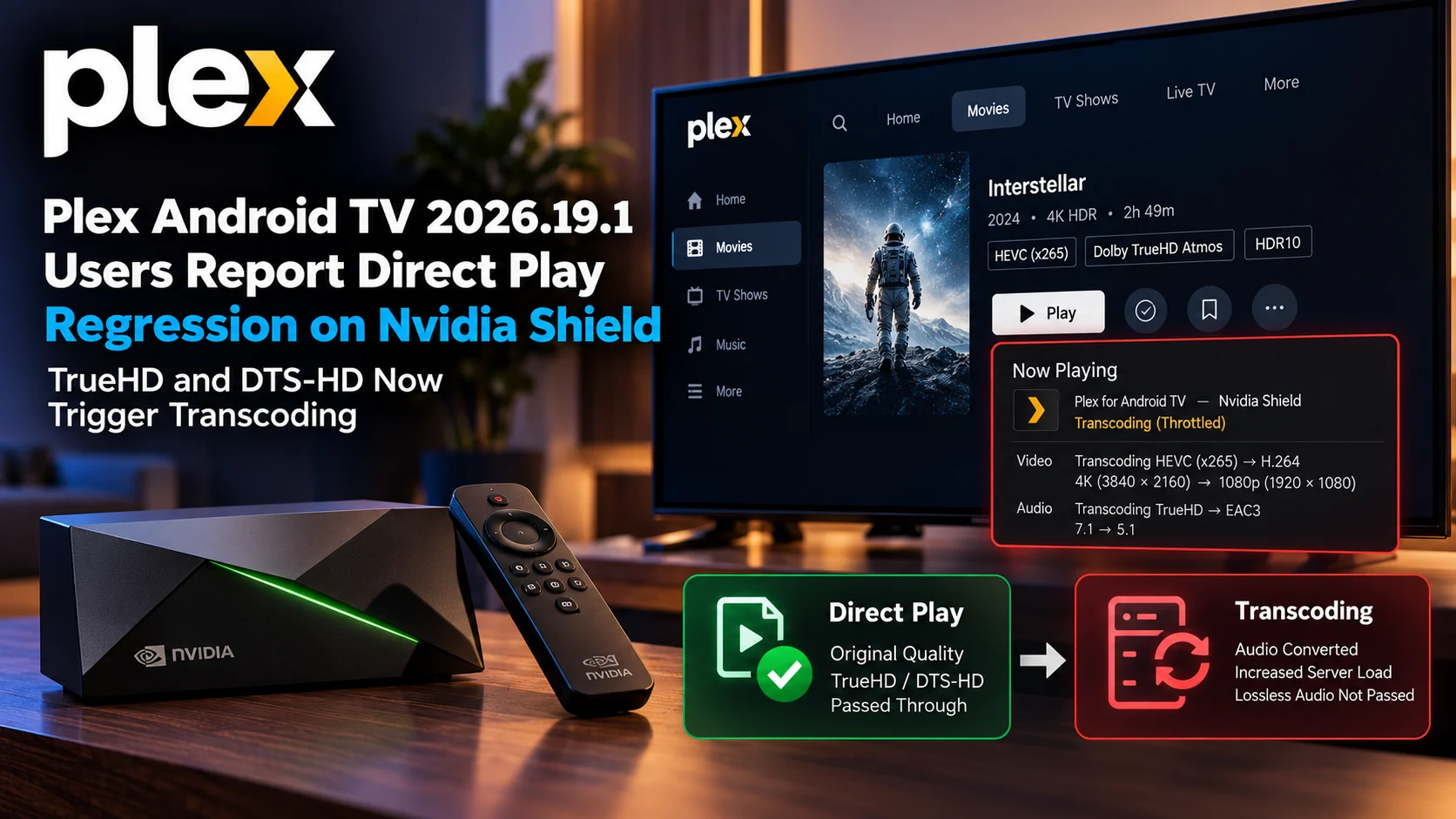
Plex Android TV 2026.19.1 is drawing complaints from some Nvidia Shield users who say media that previously played directly is now unexpectedly triggering server-side transcoding.
The reports are especially notable because they involve formats that helped establish the Nvidia Shield TV Pro as one of the most popular Plex clients for home-theater enthusiasts.
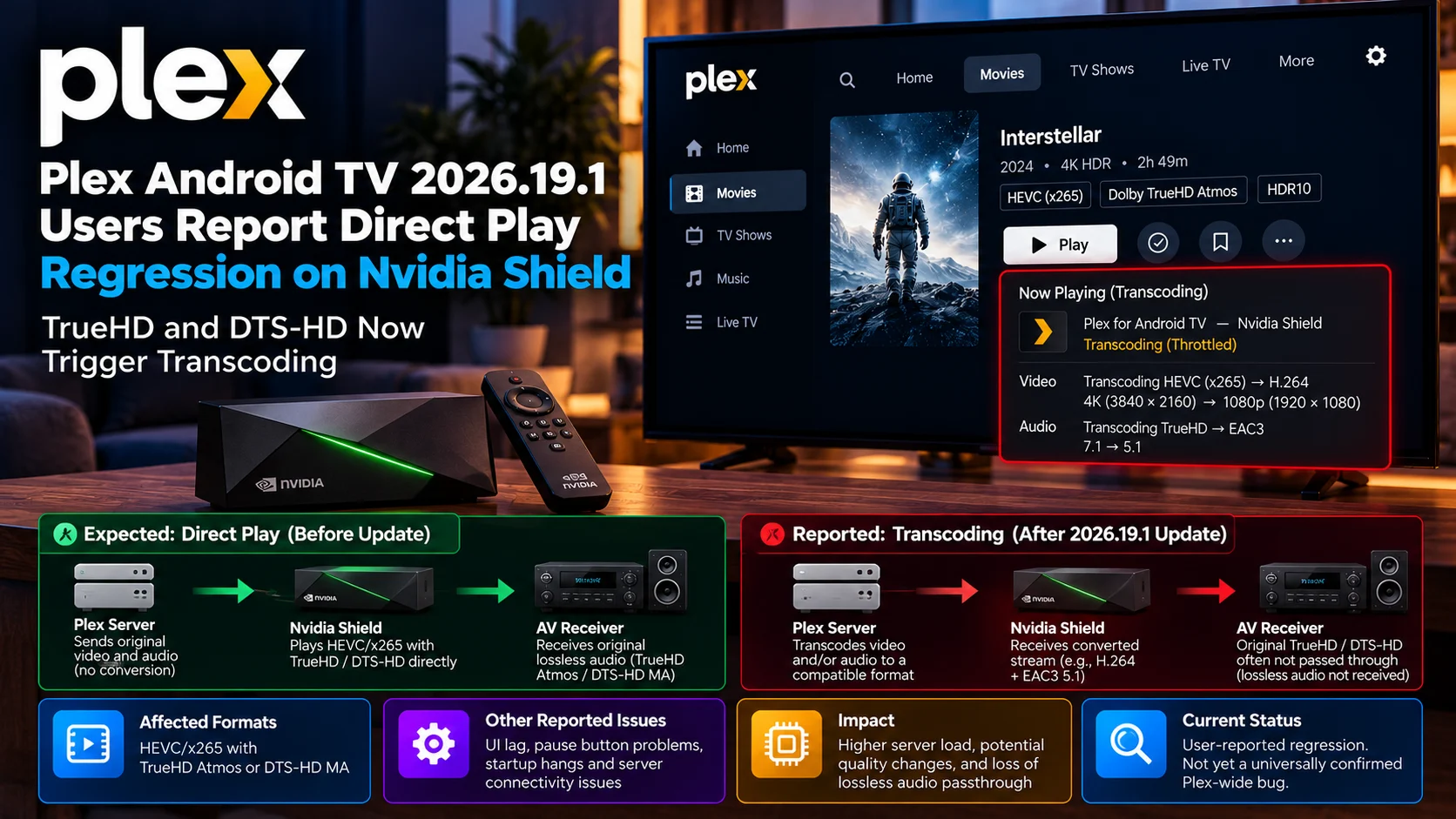
Users have specifically reported problems with x265/HEVC video paired with DTS-HD Master Audio or Dolby TrueHD/Atmos audio. Instead of preserving the original streams and passing supported audio through to an AV receiver, Plex may decide the file is incompatible and transcode it, even on a powerful Plex server, which may initially seem like a minor inconvenience.
For users who deliberately built a Shield-based setup around Direct Play, however, it changes the entire playback path. Transcoding can increase server load, alter audio behavior, reduce quality, or prevent high-end lossless audio from reaching the receiver in its original form.
It is important to be precise: these are currently user-reported regressions associated with Plex Android TV 2026.19.1 and the new player experience, not proof that every Shield installation or every TrueHD/DTS-HD file is affected. Still, the number and variety of related reports make this a release worth watching closely.
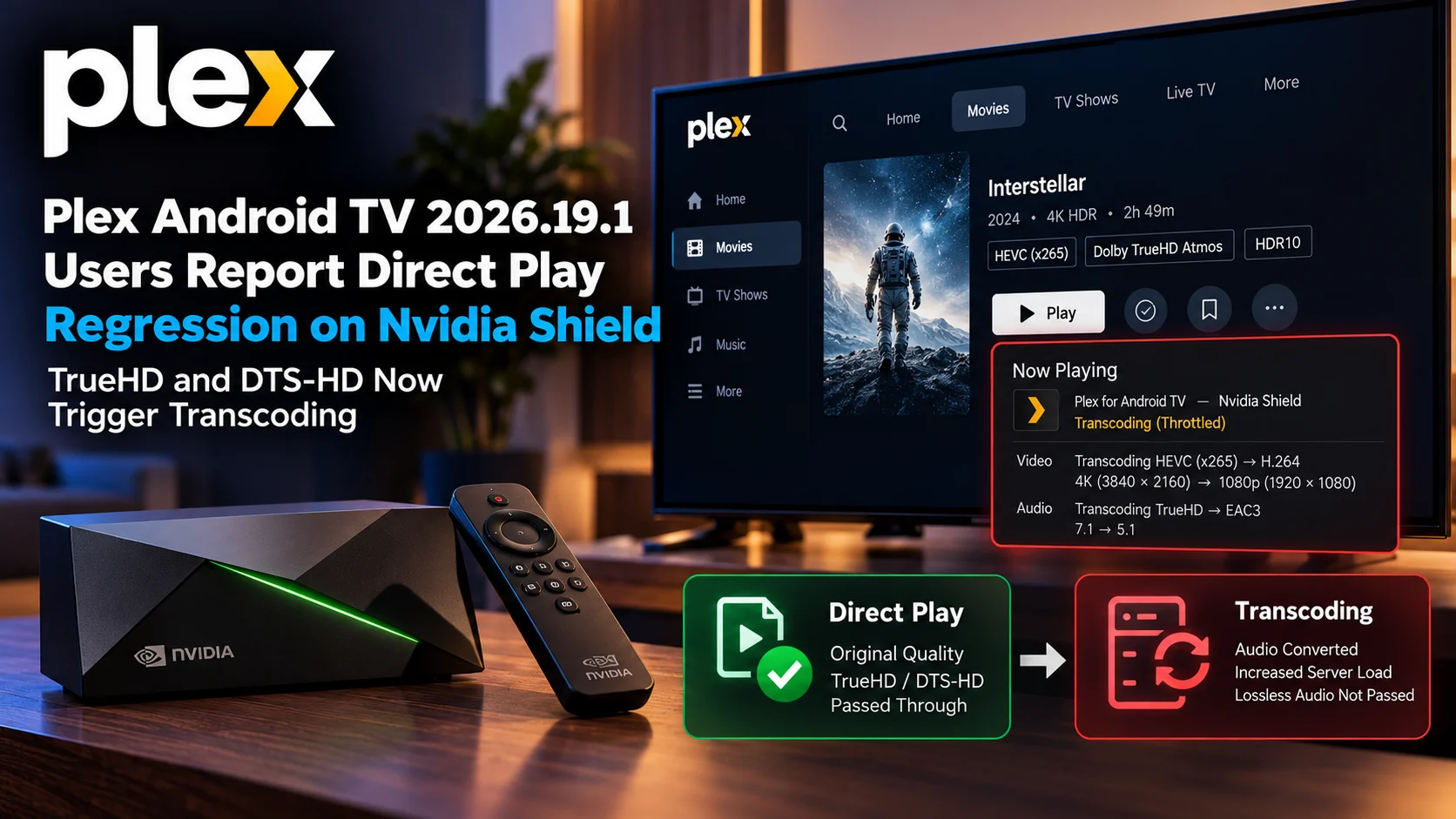
Plex Android TV 2026.19.1 Issue at a Glance
| Area | Reported Behaviour | Why It Matters |
|---|---|---|
| Nvidia Shield | Previously Direct Play-capable files may transcode | Shield is widely used specifically for advanced local playback |
| Dolby TrueHD | Some TrueHD/Atmos streams reportedly trigger transcoding | Can prevent original lossless audio passthrough |
| DTS-HD MA | Some users report DTS-HD playback falling back to transcoding | Changes audio quality and server workload |
| HEVC/x265 | High-quality x265 files are frequently mentioned | Common format in 4K personal-media libraries |
| Direct Play | Plex may incorrectly classify a supported combination | Unnecessary transcoding can occur |
| Server load | Video or audio conversion may be triggered | More CPU/GPU usage than Direct Play |
| Android TV UI | Users also report lag and focus/navigation problems | Suggests 2026.19.1 introduced broader client regressions |
| Current status | Primarily user reports | Should not yet be treated as a universal confirmed Shield bug |
Why This Is a Big Deal for Nvidia Shield Owners
The Nvidia Shield has remained popular among Plex enthusiasts for one major reason: it can handle media combinations that many cheaper streaming devices cannot.
A typical home-theater Plex library may contain 4K HEVC video, HDR, Dolby Vision, DTS-HD Master Audio, TrueHD, and Dolby Atmos.
Many television apps can play the video but cannot pass through the lossless audio.
Other devices support some formats but require the server to transcode others.
The Shield TV Pro historically stood out because it could Direct Play a wide range of demanding files and pass supported audio formats through HDMI to an AV receiver.
That allows a Plex server to behave primarily as a file-delivery system rather than a real-time video conversion machine.
When Plex suddenly decides such a file requires transcoding, the advantage of that setup begins to disappear.
What Direct Play Actually Means in Plex
Direct Play is the simplest and usually most desirable Plex playback path.
The server sends the original media streams to the client with little or no transformation.
The Shield then uses its hardware decoder for video and, depending on the audio configuration, can pass audio through to an AV receiver.
For a high-bitrate 4K movie, this has several advantages.
The server does not need to re-encode the video.
Original picture quality is preserved.
Lossless audio can remain intact.
CPU and GPU usage remain low.
Playback startup may also be faster.
The exact behavior depends on codecs, containers, subtitles, and client settings, but Direct Play remains the ideal path for many home-theater Plex users.
What Happens When Plex Chooses Transcoding Instead
Transcoding changes the workflow significantly.
The Plex server may decode the original video or audio and convert it into another format before sending it to the Shield.
If only the audio needs conversion, the impact can be relatively small.
If the client’s capability detection causes the full file to be considered incompatible, video transcoding may also occur.
That can be much more demanding.
A large 4K HEVC source may require hardware transcoding or substantial CPU resources.
HDR can introduce tone-mapping requirements.
Lossless TrueHD or DTS-HD may be converted to another format.
Users may also see a lower bitrate or different resolution depending on server capability and client settings.
This is why a mistaken capability decision matters even if playback technically still starts.
TrueHD Atmos is one of the main reported formats.
Dolby TrueHD is commonly found on Blu-ray and UHD Blu-ray media.
When Atmos metadata is included, TrueHD can deliver a lossless immersive audio track to compatible receivers.
Streaming services usually use Dolby Digital Plus-based Atmos rather than TrueHD because it requires much less bandwidth.
Personal Plex libraries are different.
Users who archive Blu-ray-quality media often specifically want the original TrueHD Atmos track.
The Nvidia Shield is frequently chosen because it can pass this stream to a compatible home-theater receiver.
If Plex 2026.19.1 begins interpreting the Shield’s TrueHD support incorrectly, Plex may convert the audio even though the playback chain can handle it.
That makes the regression particularly noticeable to enthusiasts.
DTS-HD Master Audio Reports Are Equally Important
DTS-HD MA remains common in Blu-ray libraries.
Like TrueHD, it is a lossless format designed for high-quality home-theater playback.
A receiver may support DTS, DTS-HD MA, and DTS:X, while the Shield acts as the passthrough client between Plex and the audio system.
Several users have described situations where this previously functional path no longer behaves normally.
Some reports suggest Plex falls back to transcoding.
Others point to problems with detecting DTS capability correctly.
Because Android TV audio negotiation involves the Shield, Plex client, Android audio system, and receiver, determining exactly where the regression occurs is not always straightforward.
But from the user’s perspective, the symptom is simple: a file that used to Direct Play no longer does.
Capability Detection May Be the Key Issue
The strongest technical theory is that the new client may be incorrectly evaluating the audio capabilities available to it.
Plex clients communicate what they can play directly.
The server then uses that information when deciding whether to direct play, remux, or transcode a file.
If the client reports that TrueHD or DTS-HD is unsupported, Plex Media Server has little reason to send the original stream.
It prepares a compatible alternative instead.
This means the server may be doing exactly what it was instructed to do while the actual regression exists inside the Android TV client’s capability profile.
A similar pattern has appeared in reports from Fire TV users, where TrueHD could be marked as unsupported despite the hardware and connected audio system being capable of handling it.
That does not prove the Shield problem is identical, but it makes capability detection an important area to investigate.
HDMI Passthrough Settings Still Matter
Users troubleshooting the issue should also remember that Plex playback depends on the entire audio chain.
On Nvidia Shield, audio output configuration matters.
Inside Plex, HDMI passthrough settings matter.
The television, receiver, or sound system must advertise supported audio formats correctly.
An HDMI handshake problem can produce symptoms that look similar to an application regression.
However, recent reports are notable because affected users describe setups that previously directly played the same files before the Plex update.
That before-and-after behavior makes configuration alone less convincing as an explanation in those specific cases.
The New Android TV Experience Has Other Reported Problems
The audio-transcoding reports are not appearing in isolation.
Users of Plex 2026.19.1 have described several unrelated problems after moving to the newer Android TV experience.
Some Nvidia Shield owners report significant interface lag, delayed remote-button responses, and slower poster loading.
Others have reported the pause button becoming unreliable or unresponsive.
There are complaints about the app hanging during cold startup and requiring a force stop before it launches properly.
Some users say local Plex servers appear unavailable even though those same servers remain accessible from web and mobile clients.
Watchlist playback and Dolby Vision refresh-rate switching have also generated complaints.
That broader context matters because it suggests 2026.19.1 may be exposing several independent regressions rather than one isolated codec issue.
Dolby Vision Refresh—Rate Switching Has Also Been Reported
Another Shield-specific report involves refresh-rate switching with 4K Dolby Vision content.
Some users say HDR10 and standard content still trigger the expected refresh-rate change while Dolby Vision titles remain at the Shield’s default display rate.
For example, a 24fps Dolby Vision movie may continue playing through a 60Hz output instead of switching to 24Hz.
That can introduce visible judder.
Reports indicate this particular issue may already have a correction in newer beta builds, which is encouraging.
It also demonstrates how quickly player behavior can change between one Plex Android TV build and the next.
TrueHD Problems Have Also Appeared on Fire TV
The Android TV regression becomes more interesting when compared with separate Fire TV complaints.
Some Fire TV users have reported that newer Plex clients no longer recognize TrueHD support correctly.
In those cases, Plex may mark the format as unsupported and transcode it even though forcing Direct Play can allow playback to work.
There have also been reports involving FLAC capability detection.
Again, this does not mean one bug is definitely responsible for all platforms.
Fire TV and Nvidia Shield have different hardware and audio pipelines.
But the similarity suggests Plex’s newer playback capability logic deserves close attention.
Force Direct Play May Work in Some Cases
Some Plex clients expose a Force Direct Play option.
When this works, it can help determine whether the hardware itself is actually capable of playing the file.
If normal playback triggers transcoding but forced Direct Play succeeds with proper audio output, that strongly suggests the automatic capability decision may be wrong.
However, Force Direct Play should not be treated as a universal fix.
It tells Plex to be less conservative.
If a different file really does contain an unsupported codec, subtitle format, or container combination, forcing playback can produce silence, errors, or other failures.
It is best considered a diagnostic or temporary workaround rather than a permanent replacement for correct client capability detection.
Server Settings May Not Be the Cause
When users see unexpected transcoding, the first instinct is often to change server settings.
That can be useful, but it can also send troubleshooting in the wrong direction.
If the same server, same file, same network, and same Shield setup Direct Played before the Plex client update, the server is not automatically the most likely cause.
Checking the Plex Dashboard or playback information is more useful.
The dashboard can show whether the video is Direct Play, Direct Stream, or Transcode.
It can also indicate whether audio alone is being converted.
That information helps identify which part of the media profile Plex believes is incompatible.
Rollback Reports Support the Client-Regression Theory
Some users who encountered audio problems with newer Plex Android TV builds have reported that returning to an older stable version restored their expected playback behavior.
That does not establish a universal fix because builds, devices, and server versions differ.
However, rollback behavior is useful evidence when diagnosing regressions.
If one Plex client version transcodes a file and an earlier version Direct Plays the same file with the same server and hardware, that narrows the investigation dramatically.
It suggests the media itself is unlikely to be the root problem.
Plex Should Be Careful With Shield-Specific Regressions
The Nvidia Shield occupies an unusual position in the Plex ecosystem.
It is older hardware, but it remains heavily used by enthusiasts specifically because of its playback capabilities.
Users who buy inexpensive streaming sticks may accept audio conversion as part of the experience.
Shield users often purchased the device precisely to avoid it.
A regression affecting TrueHD or DTS-HD therefore has a disproportionately large impact on this audience.
Even if the total number of affected users is relatively small compared with Plex’s entire user base, they represent some of the service’s most technically demanding and loyal home-theater customers.
What Shield Users Should Check
Before assuming every transcode is caused by Plex 2026.19.1, users should confirm the actual playback path.
Check whether the video, audio, or both are being transcoded.
Verify that HDMI passthrough remains enabled.
Confirm that the Shield still detects the expected surround formats.
Test more than one TrueHD or DTS-HD file.
If possible, compare behavior with another Plex client version or another playback application.
That comparison is often more useful than repeatedly changing server settings.
Is the Nvidia Shield Still a Good Plex Device?
The reported regression does not suddenly make the Shield incapable of advanced playback. Its underlying hardware and passthrough abilities remain unchanged. The current concern is primarily about how the latest Plex client is using those capabilities.
That distinction is important. A software update can break Direct Play behavior, and another can restore it. The Shield remains valuable precisely because alternative clients can still use its hardware.
Some affected users have already reported temporarily moving to other media clients while waiting for Plex to improve the new Android TV player.
Final Thoughts
The reports surrounding Plex Android TV 2026.19.1 on Nvidia Shield deserve attention because they affect exactly the kind of playback the Shield is famous for.
For years, Shield users have relied on Direct Play for high-quality HEVC video combined with lossless Dolby TrueHD, Atmos and DTS-HD Master Audio.
When Plex suddenly decides those streams need transcoding, it undermines one of the strongest reasons to use the device.
The good news is that nothing in these reports suggests the Shield has lost its hardware capabilities.
The more likely issue is somewhere in the updated Plex client’s playback negotiation, codec capability detection, or audio profile handling.
That means the regression is potentially fixable through software.
For now, Shield owners should verify their playback information carefully rather than assuming every file is being handled normally after the update.
And Plex should prioritize these reports because advanced audio passthrough is not a niche extra for many Shield users—it is the core reason the device remains in their home-theater setup.
FAQs About Plex 2026.19.1 on Nvidia Shield
1) What problem are Nvidia Shield users reporting?
Some users report that files with HEVC/x265 video and TrueHD Atmos or DTS-HD MA audio now trigger transcoding instead of Direct Play after updating Plex on Android TV.
2) Is every Nvidia Shield affected?
There is no evidence that every Shield installation is affected. The issue should currently be treated as a user-reported regression rather than a universal confirmed failure.
3) Why is TrueHD important?
TrueHD is a lossless Dolby audio format commonly found on Blu-ray and UHD Blu-ray media. It can also carry Dolby Atmos metadata.
4) Why is DTS-HD MA important?
DTS-HD Master Audio is another lossless Blu-ray audio format used in many personal movie libraries.
5) Does transcoding reduce quality?
It can. Audio transcoding changes the original audio format, while video transcoding can alter bitrate, resolution, HDR behavior or picture quality.
6) Can Force Direct Play help?
In some reported cases, forcing Direct Play can bypass incorrect capability detection, but it may not be safe or effective for every media file.
7) Are there other reported Plex 2026.19.1 problems?
Yes. Users have reported interface lag, startup problems, pause-button issues, server connectivity problems, Watchlist playback regressions, and refresh-rate switching issues.
8) Has Plex confirmed a universal Shield Direct Play bug?
The current Nvidia Shield reports should not yet be described as a universally confirmed Plex bug. They remain user reports and may depend on specific devices, audio chains, and media combinations.
Stay Updated with the Player SDK Guide Hub
Video-player regressions can change playback behavior even when the server, television, and media files remain the same.
The Player SDK Guide Hub tracks developments across Plex, Nvidia Shield, Android TV, Google TV, Fire TV, Apple TV, Roku, Jellyfin, Infuse, Kodi, VLC, and other streaming ecosystems.
We cover Direct Play problems, codec regressions, player releases, audio passthrough issues, and platform updates to explain what changed, which devices are affected, why it matters, and what users and streaming teams should test next.
Explore the Player SDK Guide Hub for the latest Plex, Nvidia Shield, and media-player updates.
