Nova Video Player has released version 6.5.2, a substantial stable update focused heavily on playback reliability, network-streaming performance, and audio/video synchronization across Android devices.
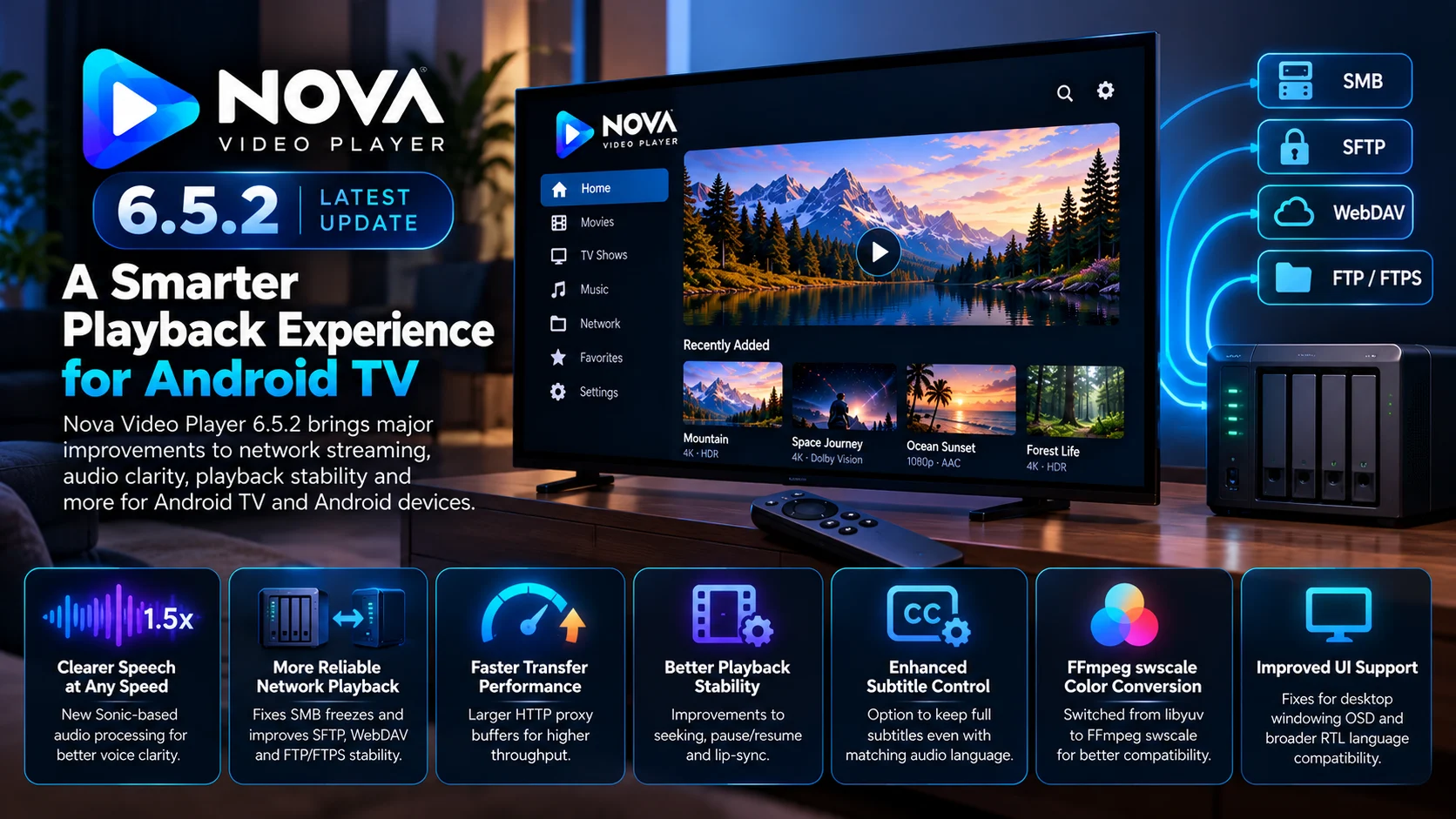
The latest release adds Sonic-filter-based playback-speed processing for clearer speech, fixes an occasional freeze affecting the default jcifs-ng SMB implementation, increases HTTP proxy buffers for significantly better network throughput, and improves transfer stability across SMB, SFTP, and WebDAV. Nova has also moved its internal video color conversion to FFmpeg swscale and strengthened seeking, pause/resume, lip-sync, and audio-passthrough behavior.
For Android TV users, those changes are especially relevant because Nova is widely suited to playing media stored on PCs, NAS systems, and other network sources rather than only files stored locally. The project officially describes Nova as an open-source player for Android phones, tablets, and TVs and supports adding network shares as media sources.
Version 6.5.2 is therefore not primarily a visual redesign. It is an under-the-hood update aimed at making the player faster and more dependable during real-world playback.
What Is New in Nova Video Player 6.5.2?
Nova 6.5.2 touches several different parts of the playback stack.
The headline audio addition is a Sonic-based audio-speed filter designed to preserve better voice and speech clarity when users change playback speed. Network playback gets a larger collection of fixes, including stronger FTP/FTPS support, a fix for SMB multicredit-related freezes, and better handling of remote transfers.
The HTTP proxy used in some network-playback paths also receives larger multimedia buffers. Nova says this can unlock a 4x speed increase in the affected jcifs-ng path, although that should be understood as a transfer-performance improvement in that specific pipeline rather than a universal fourfold speed boost for every file or network.
Several player-engine fixes are included as well, covering lip-sync, seeking, pause/play transitions, and playback resume for both PCM-decoded audio and passthrough audio.
Nova Video Player 6.5.2 Changes at a Glance
| Area | What Changed | Why It Matters |
|---|---|---|
| Playback speed | Sonic-based audio-speed processing | Clearer speech when changing playback speed |
| SMB | Fix for occasional jcifs-ng multicredit freeze | More reliable NAS playback |
| HTTP proxy | Larger buffers plus range/cancellation fixes | Higher remote-media throughput |
| SFTP / WebDAV | More stable transfers and cancellation | Better remote-library reliability |
| Video color | Moved from libyuv to FFmpeg swscale | More robust internal video conversion |
| A/V sync | Improvements to seek, pause/resume, and lip-sync | More predictable playback |
| Subtitles | Option to retain full subtitles with matching audio language | Better accessibility and user control |
| Android UI | Desktop-windowing OSD and RTL fixes | Better support for newer Android form factors |
These changes are documented in Nova’s official 6.5.2 release notes.
New Sonic Audio Processing Targets Clearer Speech
One of the easiest changes for users to notice is the new Sonic-filter-based audio-speed system.
Playback-speed controls can be useful for lectures, dialogue-heavy programs, and long-form content, but speeding up or slowing down audio can make voices sound unnatural if pitch and timing correction are not handled well.
Nova says the new Sonic-based implementation is specifically intended to improve voice and speech clarity while playback speed is altered.
That may sound like a relatively isolated feature, but audio timing has been a recurring engineering focus for Nova.
Earlier updates addressed problems such as pitch drift after playback-speed changes, audio starvation during demuxing, and synchronization problems around seeking and passthrough. Nova’s changelog shows continued work on these playback fundamentals throughout the current release cycle.
The new Sonic integration builds on that work rather than simply adding another speed selector.
SMB Playback Gets an Important Stability Fix
Network playback is arguably the biggest area improved in version 6.5.2.
Nova supports network shares and is commonly used with NAS systems and home servers. The project has invested heavily in improving SMB throughput and compatibility, including work around jcifs-ng, smbj, lease keys, multicredit behavior, and readahead.
The latest stable release fixes an occasional jcifs-ng freeze caused by multicredit support.
Multicredit transfers allow SMB clients to make larger or more efficient requests, which can help when moving the amount of data required for high-bitrate video. But an optimization is not useful if it occasionally locks up the transfer.
For Android TV users playing large files from a NAS, this type of stability fix can be much more important than a new interface feature.
HTTP Proxy Buffers Can Increase Network Throughput
Nova also increases the buffers used by its HTTP proxy during multimedia playback involving jcifs-ng.
According to the official changelog, this can provide up to a 4x speed increase in the affected path.
That does not mean movies suddenly play at four times normal speed.
Instead, it means Nova can potentially pull media data from the remote source much faster, increasing the amount of bandwidth available to the player.
That extra headroom matters when streaming high-bitrate 4K video from a NAS or remote server.
If the connection itself is capable of delivering the required bandwidth but the player’s transfer path becomes the bottleneck, larger and more efficient buffers can help reduce unnecessary playback stalls.
Range Requests and Unknown-Length Streams Are More Robust
The HTTP proxy receives more than a raw buffer increase.
Version 6.5.2 also fixes range handling, unknown-length streaming and request cancellation.
Range requests are fundamental to modern media playback.
When a viewer jumps from the beginning of a movie to a point much later in the timeline, the player should request the relevant part of the file rather than download everything before it.
Problems with byte ranges can therefore produce failed seeks, unexpected restarts, or playback interruptions.
Unknown-length streams create another challenge because the player cannot rely on a traditional total file size.
Nova’s new fixes strengthen these less-visible pathways, which often become important only when users begin seeking aggressively or working with unusual remote sources.
SFTP and WebDAV Playback Also Improve
Nova is not limited to SMB.
Its documentation explains that network sources can be added to the library, while the player has long supported multiple remote-access methods.
Version 6.5.2 specifically improves SMB, SFTP, and WebDAV transfer stability and cancellation handling.
This matters whenever a user exits a movie, starts another video, or seeks while a network read is still underway.
A transfer that does not cancel correctly can waste bandwidth or leave resources occupied after the player has already moved on.
Improved cancellation therefore contributes to smoother transitions between playback states, not just more reliable downloads.
Nova Moves Video Color Conversion to FFmpeg swscale
Another technical change replaces libyuv with FFmpeg swscale for video color conversion.
Color conversion happens inside the playback pipeline when decoded frames need to be transformed between pixel formats or representations before display.
Most users will never interact with this component directly.
But moving the job to FFmpeg’s widely used swscale library gives Nova another way to consolidate video processing around the FFmpeg ecosystem.
The change is aimed at improving the player’s internal compatibility and conversion handling rather than adding a user-facing color setting.
Seeking and Resume Reliability Get More Attention
Media players are often easiest to break when users stop watching passively and begin interacting with playback.
Pause the video. Seek forward. Resume. Change output mode. Jump backward. Switch audio tracks.
Each of those actions can force the decoder, renderer, and audio pipeline to re-establish timing.
Nova 6.5.2 includes what its developers describe as multiple robustness improvements around lip-sync, seek, pause/play, and resume, including both PCM decoding and audio passthrough.
These fixes are especially relevant to Android TV setups using receivers, soundbars, or HDMI passthrough.
Previous Nova releases have also fixed problems involving E-AC3 passthrough synchronization, startup sync, and audio-delay smoothing, showing that reliable output timing remains an ongoing priority.
Subtitle Users Get a Useful New Preference
Nova 6.5.2 introduces an option to keep full subtitles enabled even when the audio language matches the local language.
Automatic subtitle logic often assumes that viewers do not need subtitles when they can already understand the selected audio language.
That is not always true.
Same-language subtitles can be valuable for accessibility, quiet dialogue, difficult accents, or simply personal preference.
Giving users explicit control prevents automatic language matching from overriding those preferences.
Better RTL Support Expands Nova’s Interface
The release also makes more of Nova’s interface compatible with right-to-left languages, including Arabic, Hebrew, and Persian.
Nova notes that the main player retains the standard media-player orientation, while the surrounding application interface receives RTL improvements.
This is not a headline playback feature, but it is an important usability improvement for international users.
A media library application includes far more than a playback surface: settings, metadata, file browsers, and navigation all need to behave naturally in the selected language.
Desktop Windowing Prepares Nova for New Android Devices
Nova also fixes OSD controls being clipped in Android desktop windowing mode.
The developers explicitly describe this as preparation for Android laptops.
That gives an interesting hint about how Android media applications are evolving.
Nova is traditionally associated with phones, tablets, and Android TV, but newer Android environments increasingly support resizable desktop-style windows.
Ensuring playback controls remain visible and correctly positioned in those environments makes the player more adaptable beyond conventional TV and mobile layouts.
Is Nova 6.5.2 Only for Android TV?
No.
Nova describes itself as an open-source player designed for Android tablets, phones, and TVs.
Version 6.5.2 is therefore a general Android release rather than a separate TV-only edition.
However, several improvements are especially meaningful on television hardware.
SMB and NAS playback, audio passthrough, remote-media buffering, and stable seeking are all common priorities in Android TV environments.
So while mobile users benefit too, Android TV users with network libraries are likely to notice some of the most important changes.
Why Nova 6.5.2 Matters for NAS Users
Playing a file from a NAS involves much more than decoding video.
The player needs to authenticate with the network share, negotiate the protocol, request data efficiently, maintain sufficient buffering, handle seeks, cancel obsolete transfers, and keep audio/video timing stable throughout playback.
Version 6.5.2 improves several of those stages simultaneously.
The SMB freeze fix strengthens the connection layer.
The larger proxy buffers improve potential throughput.
Range-request fixes support more reliable seeking.
SFTP and WebDAV changes improve alternative network sources.
Then the native engine changes help maintain sync once playback is underway.
That combination makes Nova 6.5.2 particularly relevant for users whose media library lives somewhere other than the Android device itself.
Final Thoughts
Nova Video Player 6.5.2 is a playback and network-focused update that should be especially interesting to Android TV and NAS users.
The release improves voice clarity at altered playback speeds, fixes SMB freezes, strengthens FTP/SFTP/WebDAV behavior, and increases HTTP proxy buffering for better remote-media throughput.
Its less visible changes may prove equally important. Seeking, pause/resume, audio passthrough, and lip-sync have all received additional robustness work, while FFmpeg swscale now handles internal video color conversion.
Nova has also improved subtitle preferences, RTL interfaces, and Android desktop-windowing support. None of those changes dramatically redesign the application. Instead, version 6.5.2 focuses on the areas that determine whether a video player feels dependable during everyday use.
For viewers running Nova on Android TV with a media library stored on a NAS or another remote system, this is a particularly relevant update.
FAQs About Nova Video Player 6.5.2
1) Is Nova Video Player 6.5.2 the latest stable version?
Yes. Nova’s official GitHub releases page currently identifies v6.5.2 as the latest stable release.
2) Does Nova 6.5.2 work on Android TV?
Yes. Nova is designed for Android phones, tablets, and TVs, so Android TV devices are part of its supported device family.
3) What changed with SMB playback?
The release fixes an occasional freeze in the default jcifs-ng path related to multicredit support and improves general SMB transfer stability.
4) Is Nova network playback really four times faster?
Nova says larger HTTP proxy buffers can unlock up to a 4x speed increase in the affected jcifs-ng multimedia path. It is not a universal fourfold performance guarantee for every file or network.
5) What changed with playback speed?
Nova now uses Sonic-filter-based audio-speed processing intended to keep speech clearer when playback speed is changed.
6) What changed with subtitles?
A new setting allows users to keep full subtitles even when the current audio language matches the local language.
7) Does Nova support network media libraries?
Yes. Nova’s documentation supports adding network shares as media sources, making remote-library playback a core part of the player experience.
Stay Updated with the Player SDK Guide Hub
Video-player reliability increasingly depends on much more than codec support. Network protocols, buffering, audio synchronization, subtitles, passthrough, and platform behavior can all influence the viewing experience.
The Player SDK Guide Hub tracks the latest developments across Nova Video Player, VLC, Kodi, Plex, Android Media3, ExoPlayer, Fire TV, Roku, Google TV, Android TV, Apple TV, and other media-player and streaming-device platforms.
We follow release notes, playback fixes, networking updates, OS changes, and developer APIs to explain what changed, which devices and workflows are affected, why it matters, and what developers and streaming teams should watch next.
Explore the Player SDK Guide Hub for the latest video-player releases, Android TV updates, streaming-device news, and developer-focused playback insights.
