MPC-BE 1.9.2 has arrived with a technically focused collection of upgrades for Windows users who care about hardware video decoding, professional chroma formats, high-resolution audio conversion, color handling, and renderer performance.
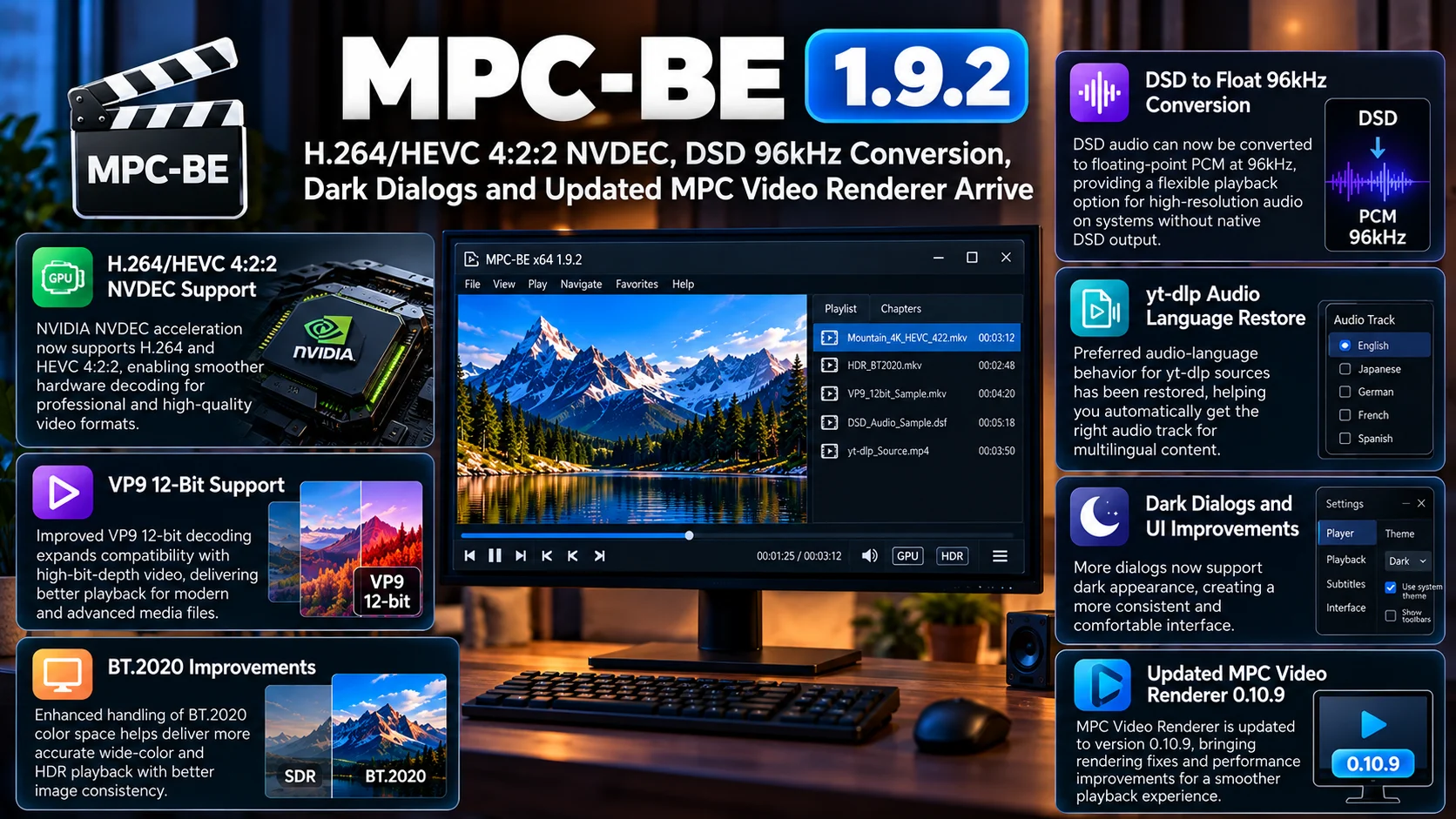
The release expands NVIDIA NVDEC support for H.264 and HEVC 4:2:2 video, improves hardware decoding behavior, adds support for VP9 12-bit, and brings further refinements related to BT.2020 color handling.
Audio playback also receives an important enhancement. DSD material can now be converted to floating-point PCM at 96kHz, providing another playback path for systems where native DSD output is not being used.
MPC-BE 1.9.2 also restores preferred audio-language behavior for yt-dlp sources, extends dark-theme consistency to more dialogs, and bundles a newer MPC Video Renderer 0.10.9.
The result is not a dramatic redesign of the classic Windows player. Instead, version 1.9.2 strengthens the exact areas MPC-BE users usually care about most: efficient decoding, accurate video presentation, flexible audio output, and a lightweight desktop experience.
MPC-BE 1.9.2 at a Glance
| Area | What Changed | Why It Matters |
|---|---|---|
| NVIDIA NVDEC | H.264 and HEVC 4:2:2 hardware decoding support | Better GPU acceleration for less-common professional video formats |
| VP9 | 12-bit decoding support improved | Expands compatibility with high-bit-depth VP9 contentc |
| Hardware Decoding | Additional optimizations | Can reduce CPU load and improve playback efficiency |
| Color Handling | BT.2020-related improvements | Helps maintain more accurate handling of wide-color video |
| DSD Audio | Conversion to Float PCM at 96kHz | Provides a flexible output path for high-resolution audio |
| yt-dlp | Preferred audio-language behavior restored | Helps automatically select the desired audio track |
| Interface | More dialogs support dark appearance | Creates a more consistent dark-theme experience |
| Video Renderer | MPC Video Renderer updated to 0.10.9 | Brings newer rendering fixes and improvements |
H.264 and HEVC 4:2:2 NVDEC Support Is the Headline Upgrade
The biggest technical addition in MPC-BE 1.9.2 is expanded NVIDIA NVDEC acceleration for 4:2:2 H.264 and HEVC video.
Most consumer video uses 4:2:0 chroma subsampling.
That format reduces color information compared with the full-resolution brightness channel, which saves bandwidth while maintaining excellent visual quality for movies, television, and ordinary streaming content.
Professional video workflows sometimes use 4:2:2 instead.
The format preserves more horizontal chroma information and is common in production, broadcast acquisition, intermediate files, and certain high-quality camera formats.
Because 4:2:2 video is much less common in everyday consumer libraries, hardware acceleration has historically been less consistent than it is for ordinary 4:2:0 media.
MPC-BE 1.9.2 expands that capability for compatible NVIDIA hardware.
Why Hardware 4:2:2 Decoding Matters
Software decoding can handle many advanced formats, but it places significantly more work on the CPU.
That becomes particularly important with high-resolution HEVC.
A powerful desktop processor may decode the file without difficulty, but hardware acceleration remains preferable when available because dedicated video-decoding blocks are designed specifically for the task.
NVDEC can reduce CPU utilization and make playback more efficient.
That may help systems remain cooler and quieter while also leaving processing power available for other tasks.
The benefit becomes more noticeable with demanding combinations such as high resolution, high bit depth, and unusual chroma formats.
Users working with camera footage or professionally encoded material therefore have one of the strongest reasons to test MPC-BE 1.9.2.
HEVC 4:2:2 Is Becoming More Relevant
HEVC is widely associated with 4K movies and efficient consumer delivery, but it is also increasingly used in professional capture workflows.
Modern cameras can produce high-resolution HEVC footage with higher bit depth and richer chroma information.
Those files may look excellent, but they can also be significantly harder to decode than conventional movies.
A player capable of handing the job to compatible GPU hardware provides a much smoother desktop workflow.
This makes MPC-BE useful not only as a home-theater player but also as a quick inspection tool for media professionals who need to open and review unusual video files without launching a full editing package.
VP9 12-Bit Support Expands High-Bit-Depth Playback
Version 1.9.2 also improves support for 12-bit VP9.
VP9 is best known as a codec heavily used for web video, but the specification supports several advanced combinations beyond typical 8-bit playback.
Higher bit depth can represent finer tonal gradations.
That can help reduce visible banding in gradients and preserve more information in demanding source material.
Twelve-bit VP9 files are not nearly as common as mainstream 8-bit or 10-bit video, so this is another feature that primarily benefits advanced users.
Still, MPC-BE has traditionally appealed to people who expect their desktop player to open unusual media without complaint.
Expanded VP9 coverage fits that philosophy well.
Hardware Decoding Gets Additional Optimization
The update is not limited to simply adding another codec profile.
MPC-BE 1.9.2 also contains hardware-decoding optimizations.
Efficient hardware decoding requires several components to work together.
The player has to recognize the video format correctly, select the appropriate decoder, exchange frames with the GPU, and deliver those frames into the rendering pipeline.
Improvements anywhere in that process can influence playback smoothness and resource usage.
Users may therefore benefit even when playing formats that already worked before the update.
The exact result will depend on the GPU, driver, source media, and renderer configuration, but ongoing optimization is important for maintaining a responsive playback pipeline.
BT.2020 Handling Receives More Attention
Color handling is another technical area improved in this release.
BT.2020 is associated with wide-color and Ultra HD video workflows.
Correctly interpreting color metadata matters because the player and renderer need to understand how the encoded values should be mapped to the display.
Incorrect handling can result in colors that appear too dull, too saturated, or otherwise different from the intended presentation.
MPC-BE 1.9.2 includes further improvements around BT.2020 behavior.
For users with HDR-capable or wide-gamut displays, this kind of refinement is important even if it is not immediately visible as a new setting.
Accurate playback often depends on many small pieces of metadata being interpreted correctly.
MPC Video Renderer 0.10.9 Is Included
The bundled MPC Video Renderer has been updated to version 0.10.9.
The renderer is one of the most important parts of the playback chain because decoding the video is only half the job.
After frames are decoded, they still need to be displayed correctly.
The renderer handles the final stage of video presentation and can influence scaling, color conversion, timing, HDR behavior, and output quality.
Updating the renderer alongside decoder improvements helps keep the entire playback pipeline current.
For users who rely on MPC Video Renderer instead of another DirectShow renderer, the update is especially relevant.
It also reinforces the close relationship between modern hardware decoding and high-quality presentation.
A player can decode advanced media perfectly, but the benefit is limited if the display stage is inaccurate or inefficient.
DSD can now be converted to float 96 kHz.
Audio enthusiasts receive one of the most interesting additions in the release.
MPC-BE 1.9.2 adds a conversion path for DSD audio to floating-point PCM at 96kHz.
DSD uses a very different representation from conventional PCM audio.
Native DSD playback can require compatible hardware and a specific output path.
Not every Windows audio setup supports that workflow directly.
Converting the material to high-resolution PCM provides a practical alternative.
A 96kHz floating-point output path gives MPC-BE a flexible way to process DSD material through normal audio devices and software components while maintaining a high sample rate.
Why DSD Conversion Is Useful
Many users have mixed music and video libraries.
Some may own DSD albums or concert material but use the same Windows PC for movies, television, and music.
Native DSD can be convenient when the DAC and the entire output chain support it correctly.
For other systems, PCM conversion is simpler.
It allows normal Windows audio processing and broader hardware compatibility.
MPC-BE’s new 96kHz floating-point path therefore gives users another choice rather than forcing a single playback strategy.
That is consistent with the player’s broader design philosophy: support many media formats while allowing the user to decide how the final output should be handled.
yt-dlp Preferred Audio Language Is Restored
MPC-BE can also work with online media through YTDLP integration.
Version 1.9.2 restores preferred audio-language handling for this workflow.
This is important for sources that provide multiple audio tracks.
A single video may be available with original-language audio plus dubbed versions in several languages.
Without correct preference handling, the player may select an audio stream the user did not intend to hear.
Restoring preferred-language behavior allows online playback to better follow the same language expectations users already have for local media.
That can reduce manual track switching, particularly for multilingual content.
Dark Dialogs Make the Interface More Consistent
MPC-BE has gradually expanded its dark appearance, and version 1.9.2 continues that work with dark styling for additional dialogs.
The classic media-player layout remains intentionally compact.
Users who choose a dark interface generally expect configuration windows and secondary dialogs to match the main application.
When a dark player suddenly opens a bright white dialog in a dim home theater room, the contrast can be surprisingly distracting.
Expanding dark-theme support makes the application feel more consistent.
It is not as technically significant as NVDEC or renderer work, but it improves everyday usability for people who spend time configuring filters, playback options, and advanced settings.
MPC-BE Continues to Favor a Lightweight Desktop Approach
One reason MPC-BE remains popular is that it does not attempt to become a giant entertainment platform.
It is fundamentally a Windows desktop media player.
Users open a file and expect it to play quickly.
Menus remain compact.
Advanced options are available without dominating the normal interface.
There is no need for a massive home screen when the user simply wants to inspect a video or watch a locally stored movie.
Version 1.9.2 maintains that approach while modernizing the decoding and rendering technology underneath it.
This Release Is Particularly Useful for Advanced Media Libraries
A normal user playing common H.264 1080p files may not immediately notice the most technical upgrades in version 1.9.2.
The release becomes much more interesting when the library contains unusual content.
That could include 4:2:2 camera files, high-bit-depth VP9 samples, DSD audio, wide-gamut video or media requiring specialized hardware decoding.
For these users, codec support is not an abstract specification.
It determines whether a file plays efficiently or causes excessive CPU load.
That is where MPC-BE 1.9.2 makes its strongest case.
GPU Compatibility Still Matters
Hardware-decoding support does not mean every NVIDIA graphics card can accelerate every format.
NVDEC capabilities depend on the GPU generation.
The player can expose support for a format, but the underlying hardware still needs the relevant decoding capability.
Driver versions can matter as well.
Users working with advanced 4:2:2 material should therefore make sure their GPU actually supports the required profile.
If not, MPC-BE may need to fall back to another decoding path.
This distinction is important when troubleshooting hardware acceleration.
The presence of an option in the media player does not create decoder hardware that is absent from the graphics card.
Who Should Upgrade to MPC-BE 1.9.2?
Users with modern NVIDIA GPUs and 4:2:2 H.264 or HEVC media are the clearest candidates.
Video professionals who frequently inspect camera files should also pay attention.
People with DSD collections gain a useful new conversion option.
Users relying on yt-dlp sources with multiple audio languages can benefit from the restored language preference behavior.
And anyone already using MPC Video Renderer gets a newer renderer build as part of the overall player update.
For ordinary Windows media playback, the cumulative decoding, interface and rendering improvements still make 1.9.2 a worthwhile maintenance upgrade.
Final Thoughts
MPC-BE 1.9.2 is a strong technical update for users who expect a Windows media player to handle both ordinary content and demanding specialist formats.
The addition of H.264 and HEVC 4:2:2 NVDEC support is the standout improvement, particularly for users working with professional video and modern camera files.
VP9 12-bit support further broadens high-bit-depth compatibility, while continued hardware-decoding optimization helps make better use of available GPU resources.
The new DSD-to-Float 96kHz conversion gives audio enthusiasts a flexible alternative to native DSD output.
Meanwhile, BT.2020 refinements, restored yt-dlp audio-language preferences, expanded dark dialogs and MPC Video Renderer 0.10.9 improve the broader playback experience.
MPC-BE continues to prove that a classic desktop media player does not need a massive redesign to remain relevant.
By strengthening decoding, rendering and format support while keeping the interface fast and focused, version 1.9.2 gives advanced Windows users several meaningful reasons to update.
FAQs About MPC-BE 1.9.2
1) What is MPC-BE 1.9.2?
MPC-BE 1.9.2 is an update to the Windows media player focused on hardware video decoding, high-bit-depth format support, audio conversion, color handling, interface refinements and an updated video renderer.
2) Does MPC-BE 1.9.2 support HEVC 4:2:2 hardware decoding?
Yes. The release expands NVIDIA NVDEC support for compatible HEVC 4:2:2 video.
3) Is H.264 4:2:2 also supported through NVDEC?
Yes. H.264 4:2:2 hardware acceleration is another major addition for supported NVIDIA hardware.
4) What does 4:2:2 mean?
4:2:2 refers to chroma subsampling. It preserves more color information than the 4:2:0 format commonly used in consumer video and is frequently seen in professional video workflows.
5) Does the update improve VP9?
Yes. Version 1.9.2 expands support for VP9 12-bit material.
6) What changed for DSD audio?
DSD can now be converted to floating-point PCM at 96kHz, providing another playback option for systems that do not use native DSD output.
7) What version of MPC Video Renderer is included?
MPC-BE 1.9.2 includes MPC Video Renderer 0.10.9.
8) Does the update improve online playback?
Preferred audio-language behavior for yt-dlp-based playback has been restored.
9) Are there interface changes?
Yes. Additional dialogs can now follow the player’s dark appearance for a more consistent UI.
10) Will every NVIDIA GPU support H.264 and HEVC 4:2:2 decoding?
No. Hardware acceleration depends on the actual NVDEC capabilities of the installed GPU and compatible drivers.
Stay Updated with the Player SDK Guide Hub
Desktop media players continue to evolve as modern video formats become more demanding. Hardware decoding, HDR and wide-color handling, high-bit-depth codecs, advanced audio formats and GPU rendering are now central parts of the playback experience.
The Player SDK Guide Hub tracks important developments across MPC-BE, MPC-HC, VLC, Kodi, Plex, Jellyfin, Emby, Infuse, Android TV, Fire TV, Roku, Apple TV and other media platforms.
We cover player releases, codec developments, GPU decoding updates, renderer changes and media-server improvements to explain what changed, why it matters and what users and developers should test next.
Follow the Player SDK Guide Hub for the latest video-player, media-server and streaming-device updates.
