Amazon’s redesigned Fire TV interface is now available globally, bringing one of the biggest visual and navigation changes to Fire TV Sticks in recent years.
Amazon confirmed on June 22, 2026, that all current-generation Amazon Fire TV Sticks, Fire TV Cube, and Amazon Ember smart TVs purchased globally now ship with the redesigned user interface. The company had started rolling the experience out earlier in February before expanding it worldwide.
The update goes beyond changing colors and menus.
Amazon has reorganized how users find movies, TV shows, sports, news, and live programming, placed applications more prominently on the Home screen, added quicker access to settings and smart-home controls, rebuilt underlying parts of the interface for better performance, and integrated Alexa+ more deeply throughout the experience.
Amazon says its goal is simple: help viewers spend less time searching and get to something they want to watch faster. For Fire TV Stick owners, that means the device they already use may now feel noticeably different even without buying new hardware.
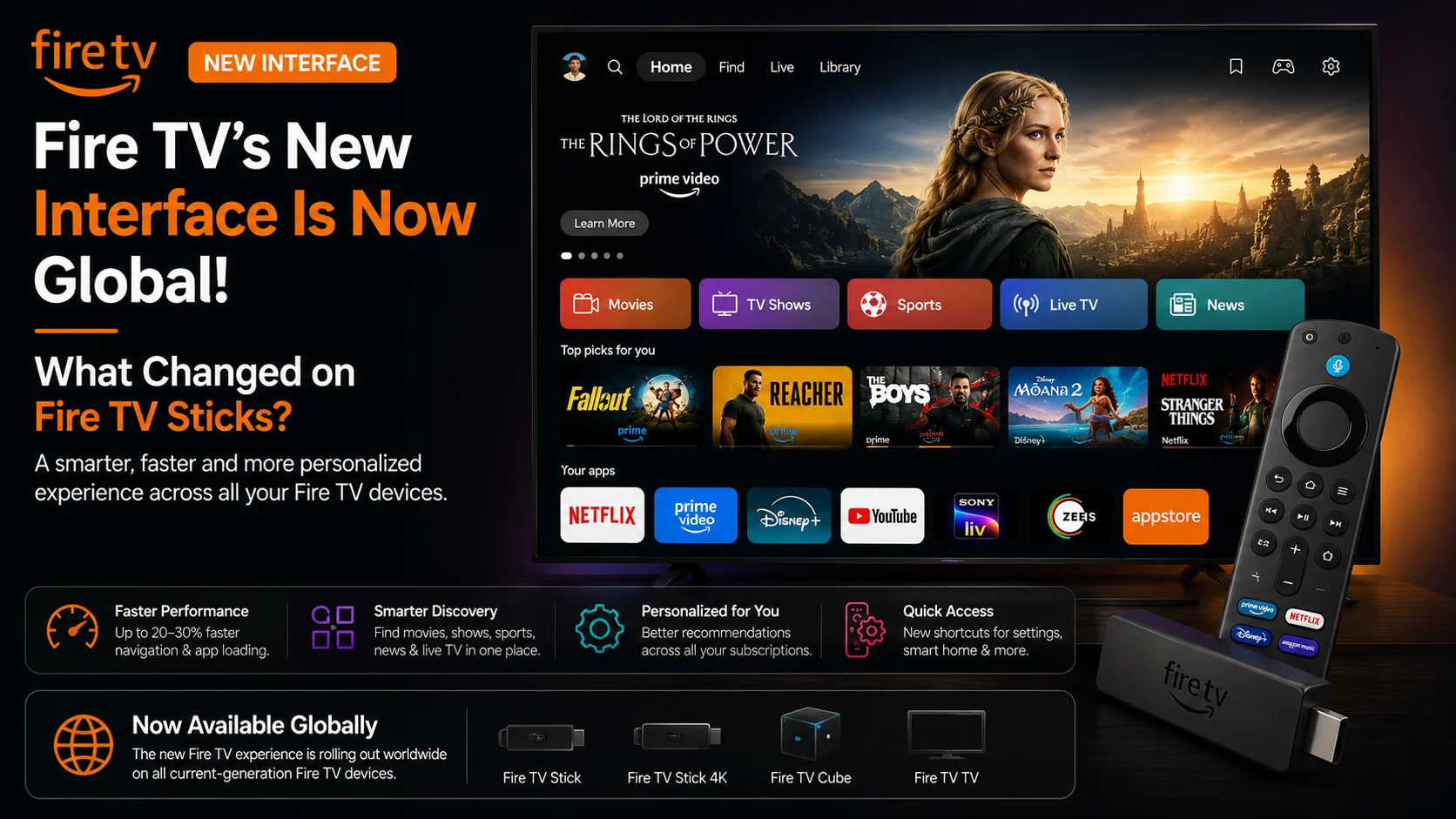
What Is the New Fire TV Interface?
The new Fire TV interface is Amazon’s redesigned television experience introduced in 2026.
The previous Fire TV interface already combined applications, recommendations, advertising, and content discovery. The new version reorganizes those elements with a cleaner visual system and a stronger emphasis on browsing by content type instead of only by application.
Amazon says the redesigned interface uses improved layouts, updated typography, optimized spacing, rounded visual elements, and redesigned color gradients. The company also rebuilt parts of the underlying code rather than simply placing a new visual theme over the existing experience.
The result is intended to make navigation feel more organized while reducing the amount of time users spend deciding what to watch.
That goal is increasingly important as viewers subscribe to multiple streaming platforms. Amazon cited Gracenote research suggesting U.S. viewers spend an average of about 12 minutes looking for something to watch, compared with 10.5 minutes in 2023.
Fire TV’s redesign is therefore primarily about improving content discovery.
Fire TV’s New Interface at a Glance
| Area | What Changed in the New FIre TV interface |
|---|---|
| Availability | Global on all current-generation Fire TV Sticks, Fire TV Cube, and Amazon Ember smart TVs |
| Navigation | Better organization around movies, TV shows, sports, news, live content, and other categories |
| Home screen | All apps can appear directly on Home and can be rearranged |
| Performance | Amazon reports up to 20–30% speed improvements in some cases |
| Design | Updated typography, rounded elements, gradients, layouts, and spacing |
| Menu button | Faster access to Games, Art & Photos, and Ambient Experience |
| Home-button shortcut | Quick panel for audio, display, Ring cameras, and smart-home controls |
| Alexa+ | Integrated across search, recommendations, watchlists, sports information, smart home, and more |
| Mobile app | Redesigned as a second screen for browsing, watchlists, playback, and remote control |
The biggest difference is that Fire TV increasingly behaves as a content discovery platform, rather than simply a screen containing rows of application icons.
Movies, Shows, Sports, and Live Content Are Better Organized
One of the most visible changes is how Fire TV groups entertainment.
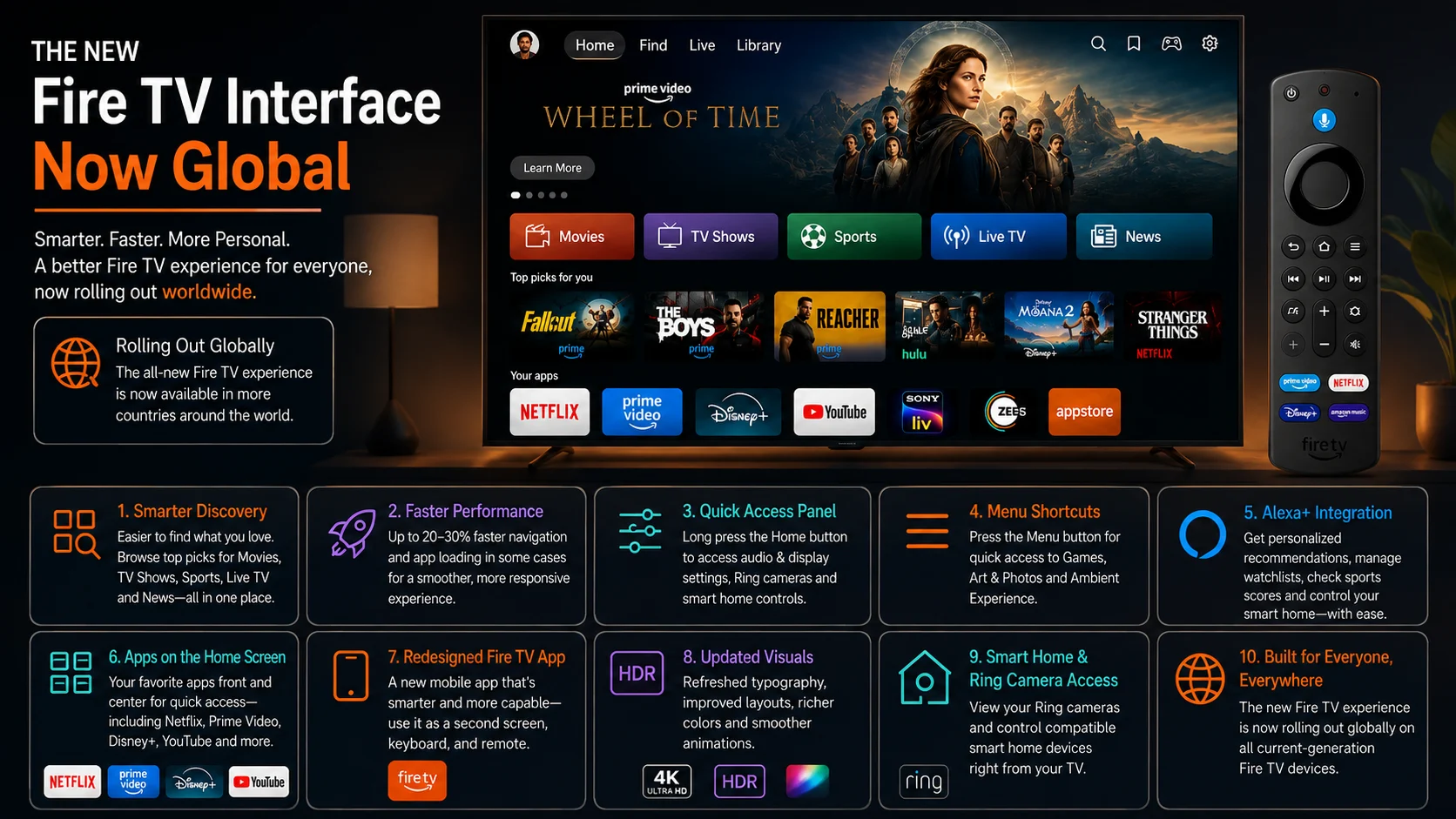
Amazon says the new experience makes it easier to browse movies, TV shows, sports, news, and live content across a user’s subscriptions.
For example, opening a movie-focused area can surface relevant titles from multiple applications the viewer already uses instead of forcing them to open each service individually and search again.
That distinction is important.
A growing number of households have multiple streaming subscriptions. Finding a movie traditionally might require opening one service, searching for the title, backing out, opening another service, and repeating the process.
Platform-level discovery attempts to reduce that friction.
Amazon is effectively using the Fire TV Home experience as a layer connecting the applications installed on the device.
All Your Apps Are Easier to Reach
Amazon has also changed how applications appear on the Home screen.
The redesigned experience allows users to keep their applications directly accessible from Home and rearrange app tiles so frequently used services can stay near the front.
This addresses an important balance in modern TV interfaces.
Amazon wants Fire TV to help users discover content across different services, but many viewers still know exactly which app they want to open.
Making apps directly accessible helps preserve that familiar workflow.
The redesigned interface therefore supports both styles of viewing: browse across services when you are unsure what to watch, or launch a specific application immediately when you already know where you want to go.
Fire TV Could Feel Up to 20–30% Faster
The interface update is not only visual.
Amazon says its engineering team rebuilt underlying code and has observed speed improvements of as much as 20% to 30% in some cases on devices customers already own.
This is particularly important for streaming hardware because interface performance can significantly affect how modern a device feels.
A streaming stick may still play 4K video perfectly well, but slow menus, delayed remote responses, or lag while opening sections can make the entire device appear outdated.
Improving the software can therefore extend the useful experience of existing hardware even when the processor and memory remain unchanged.
Amazon says eligible customers receive these improvements through a free software update, so purchasing another Fire TV Stick is not necessarily required simply to access the redesigned interface.
New Shortcuts Reduce Menu Hunting
Amazon has also reconsidered how users reach commonly used Fire TV functions.
Pressing the Menu button on the remote can now provide quicker access to areas such as Games, Art & Photos, and the Ambient Experience.
A second shortcut is available through the Home button.
Long-pressing Home opens a shortcut panel containing frequently used controls, including audio and display settings.
This panel can also provide access to connected Ring cameras and smart-home device controls.
That could reduce the need to repeatedly navigate through the full Settings hierarchy for actions users perform regularly.
It also shows how Fire TV is becoming more tightly connected to Amazon’s larger smart-home ecosystem.
Smart-Home Controls Are More Accessible
Alexa+ Is Built Throughout the Fire TV Experience
Another major part of the Fire TV redesign is Alexa+, Amazon’s generative AI-powered assistant.
Alexa+ is designed to understand more conversational requests instead of relying only on traditional voice-search keywords.
A user can describe what kind of movie they feel like watching, mention actors or directors they prefer, or provide context about who is watching. Alexa+ can then use that information to help suggest relevant entertainment.
The assistant can also interact with content already visible on screen.
Amazon says viewers can ask Alexa+ to add a title to their watchlist, provide statistics about a game, display personal photos, create AI-generated background screensavers, control connected lighting, or even jump to specific scenes in supported movies.
This creates an interesting shift in how users interact with streaming devices.
Instead of voice being primarily a faster way to type a movie title, Amazon wants conversational AI to become a broader navigation and entertainment layer.
The Fire TV Mobile App Is Now a Second Screen
The television interface is only one part of Amazon’s 2026 redesign.
Amazon has also transformed the Fire TV mobile app.
The app still works as a remote control, but it can now be used to browse content, manage the user’s watchlist, and start titles on a connected Fire TV. Its visual design has also been updated to match the new television interface.
This effectively turns a smartphone into a second screen for Fire TV.
A user can look for something to watch without keeping menus open on the television. They can also add a recommendation to their watchlist while away from home and return to it later on Fire TV.
Amazon says the redesigned Fire TV mobile app is available worldwide.
For households where several people are sitting in front of the television, this could be particularly convenient: one person can search on the phone without taking over the TV screen.
Which Fire TV Devices Get the New Interface?
Amazon’s June update confirms global availability on all current-generation Amazon Fire TV Stick devices, the Fire TV Cube, and Amazon Ember smart TVs.
The company also says the interface launched on Hisense televisions with Fire TV built in and is scheduled to expand to additional hardware.
That does not necessarily mean every Fire TV device ever released will receive the redesign.
Fire TV has existed for more than a decade and spans numerous generations of sticks, boxes, and smart televisions with very different hardware specifications.
Amazon’s official wording specifically emphasizes current-generation devices for the global rollout.
Users with much older Fire TV hardware should therefore check the software experience available on their particular model rather than assuming universal compatibility.
The New Fire TV Stick HD Ships With the Redesigned Experience
Amazon’s 2026 Fire TV Stick HD provides a good example of how the new interface fits into its current hardware strategy.
The device ships with the redesigned Fire TV experience and was introduced as Amazon’s fastest HD streaming stick yet.
Amazon says the Stick HD provides over 30% faster average performance than the previous generation, includes Wi-Fi 6, is approximately 30% slimmer than other Fire TV Sticks, and can use compatible TV USB power rather than requiring a wall adapter.
The important point is that Amazon is improving hardware and software at the same time.
Existing compatible sticks can receive parts of the performance improvement through the redesigned interface, while newer hardware combines that software optimization with faster components.
Is This the Same as Moving to Vega OS?
No. The new Fire TV interface and the underlying operating system are separate things. This distinction matters because Amazon is also transitioning future Fire TV Stick hardware toward Vega OS.
A Fire TV device can receive the redesigned user experience while still running Android-based Fire OS. The interface determines how navigation, recommendations, applications, and settings appear to the user; the operating system is the deeper software platform underneath it.
Therefore, seeing the new Fire TV Home screen does not automatically mean a device has moved to Vega OS.
That is particularly important for users comparing current and future Fire TV hardware.
Why Is Amazon Redesigning Fire TV Now?
Amazon says customers worldwide have purchased more than 300 million Fire TV devices, covering streaming players, Amazon televisions, and TVs made by partners including Hisense, Panasonic, TCL, and Xiaomi.
At that scale, even relatively small improvements to discovery and navigation can affect a very large viewing audience.
The wider streaming market has also changed.
Users now have more applications, more subscriptions, more free content, more live programming, and more ways to watch than when the earliest Fire TV Sticks launched.
The challenge is increasingly not accessing video—it is finding the right video quickly. Amazon’s redesign reflects that shift.
Final Thoughts
The global rollout of the Fire TV new interface represents much more than a cosmetic refresh.
Amazon has reorganized content discovery, made applications easier to reach, introduced faster shortcuts, improved access to smart-home controls, redesigned its mobile companion app, integrated Alexa+ throughout the experience, and rebuilt parts of the underlying UI code.
For existing compatible Fire TV Stick owners, perhaps the most important improvement is that much of this arrives through software rather than requiring new hardware.
And while Amazon’s reported 20–30% speed gains will vary depending on the device, making an existing streaming stick feel more responsive can be just as meaningful as adding another feature.
The redesign also points toward the future of streaming-device interfaces.
Fire TV is becoming less focused on opening individual apps and more focused on understanding what the viewer wants to watch, regardless of which service provides it.
Combined with Alexa+, smart-home integration, second-screen browsing, and Amazon’s broader hardware changes, the Fire TV Home screen is evolving into a more complete entertainment hub.
FAQs About the New Fire TV Interface
1) Is the new Fire TV interface available worldwide?
Yes. Amazon confirmed in June 2026 that the redesigned experience is available globally on all current-generation Amazon Fire TV Sticks, Fire TV Cube, and Amazon Ember smart TVs.
2) Do I need to buy a new Fire TV Stick?
Not necessarily. Amazon says compatible existing devices receive the redesigned experience through a free software update.
3) Is the new Fire TV interface faster?
Amazon says the rebuilt UI can deliver 20–30% speed improvements in some cases on existing hardware. Actual performance can vary by device.
4) What changed on the Fire TV Home screen?
The interface has updated layouts, typography, spacing, gradients, easier access to applications, and improved organization for movies, TV shows, sports, news, and live content.
5) Can I rearrange apps in the new Fire TV interface?
Yes. Amazon says applications can appear directly on the Home screen, and users can rearrange app tiles to keep favorites easily accessible.
6) Does the new interface include Alexa+?
Alexa+ is integrated throughout the new Fire TV experience on supported devices and regions, providing conversational recommendations, watchlist controls, sports information, smart-home actions, and other AI-assisted features.
7) Is the redesigned Fire TV interface the same as Vega OS?
No. The Fire TV UI and the device’s underlying operating system are separate. A device can use the new interface without necessarily running Vega OS.
Stay Updated with the Player SDK Guide Hub
Streaming devices and media platforms change quickly. A new Fire TV interface, operating-system update, media-player release, playback feature, or hardware launch can directly affect how viewers discover content and how streaming applications are built. That’s why we created the Player SDK Guide Hub.
The Player SDK Guide Hub covers the latest Fire TV, Google TV, Android TV, Roku, Apple TV, Kodi, Plex, VLC, and other streaming-device and media-player updates, including new interfaces, operating systems, hardware releases, playback technologies, device specifications, and developer-focused platform changes.
Whether Amazon updates Fire TV again, a new streaming device launches, Alexa+ gains additional capabilities, or another connected-TV platform introduces a major redesign, our Guide Hub helps explain what changed, which devices are affected, why it matters, and what developers and streaming teams should watch next.
Explore the Player SDK Guide Hub for the latest streaming-device news, Fire TV updates, technical guides, media-player developments, and platform insights.
