Emby for Android TV and Fire TV 2.5.03 has arrived with a substantial collection of improvements covering HDR viewing, playback quality controls, DVR management, subtitles, collections, people pages, and general TV navigation.
Rather than focusing on a single headline feature, version 2.5.03 improves several parts of the experience that users regularly interact with from the couch.
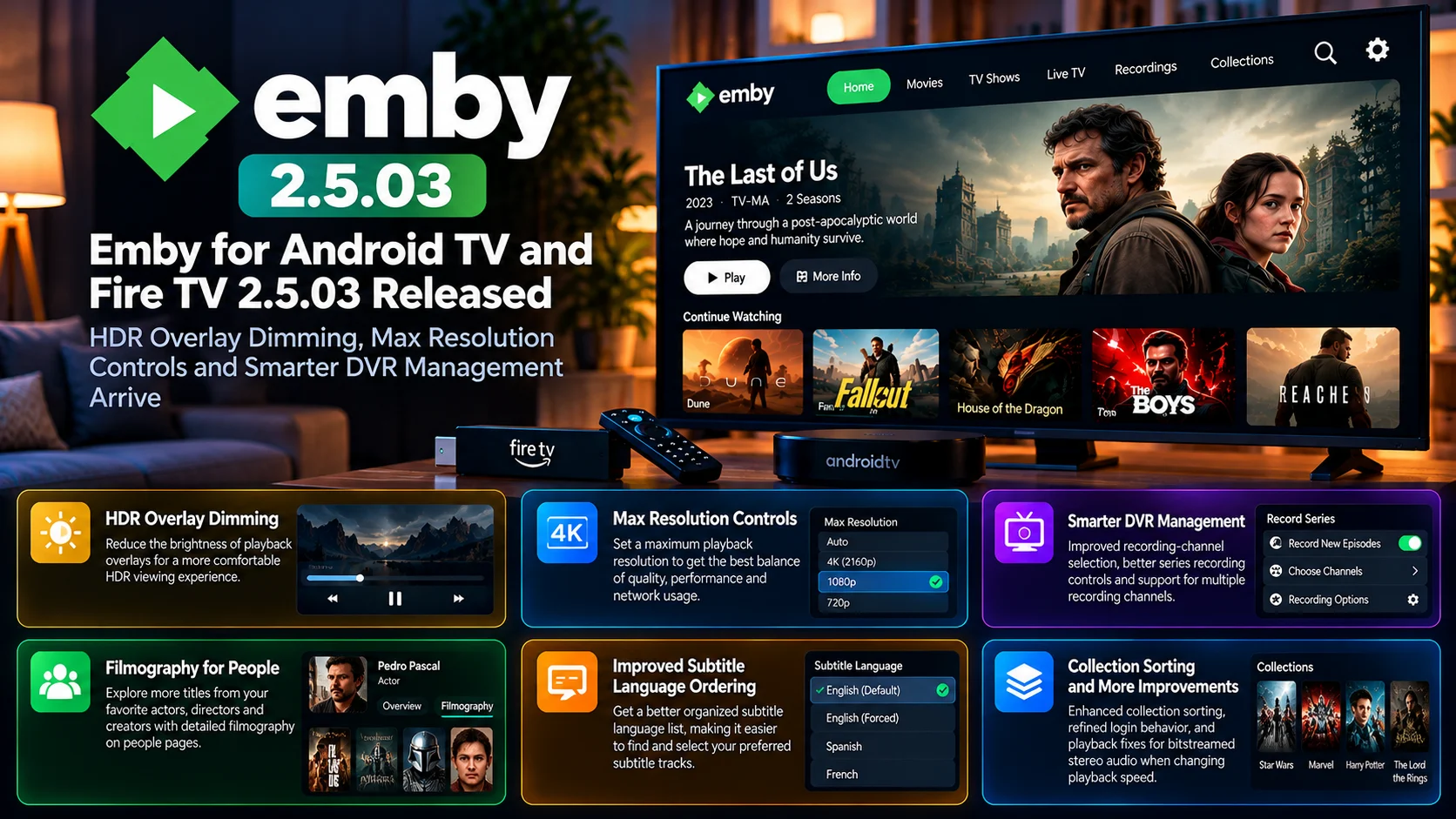
HDR users gain an option designed to make playback overlays less distracting on bright high-dynamic-range displays. A new Max Resolution setting provides greater control over playback quality and stream selection. DVR users receive smarter recording-channel selection along with improvements to series recording management and multi-channel configuration.
Emby has also refined how subtitle languages are ordered, expanded information available through people pages with filmography, improved collection sorting, and addressed login behavior.
There is even a playback fix aimed at an unusual audio scenario involving bitstreamed stereo audio when playback speed is changed.
For Android TV and Fire TV users, the result is an update focused heavily on control, consistency, and quality-of-life improvements.
Emby 2.5.03 at a Glance
| Area | What Changed | Why It Matters |
|---|---|---|
| HDR Playback | Overlay dimming option added | Makes on-screen controls less distracting during HDR viewing |
| Video Quality | New Max Resolution control | Gives users more control over playback resolution |
| DVR | Smarter recording-channel selection | Helps choose more appropriate channels for scheduled recordings |
| Series Recording | Improved controls and management | Makes recurring recordings easier to configure |
| Recording Channels | Multiple channels can be selected | Gives DVR users more flexibility |
| People Pages | Filmography added | Makes it easier to explore titles associated with an actor or creator |
| Subtitles | Language ordering improved | Preferred subtitle choices become easier to find |
| Collections | Sorting improvements | Makes larger libraries easier to organize |
| Playback | Stereo bitstream speed-change fix | Improves unusual audio playback scenarios |
| Account Access | Login behavior refined | Creates a smoother TV sign-in experience |
HDR Overlay Dimming Targets a Real Big-Screen Problem
One of the most noticeable additions in Emby 2.5.03 is HDR overlay dimming.
HDR content is designed to use a much wider brightness range than standard video. That can produce spectacular highlights, deeper contrast, and a more cinematic image on compatible televisions.
However, the same display capabilities can create an awkward situation when bright user-interface elements appear over dark HDR video.
Playback controls, progress bars, text panels, or other overlays may look significantly brighter than the movie or show underneath them.
In a dark room, that sudden brightness can be distracting.
Emby’s new overlay dimming option is designed to reduce that problem.
Instead of allowing interface elements to dominate the screen whenever playback controls appear, users can make the overlay feel more appropriate for HDR viewing.
This is a relatively small visual option, but it addresses something home-theater users may notice every time they pause, seek, or open playback controls.
Why HDR Interface Brightness Matters
HDR is not only about brighter video.
It changes how the entire display behaves.
A normal interface designed for standard brightness can feel overly aggressive when layered over HDR content, especially on modern OLED, Mini LED and high-brightness LCD televisions.
Imagine watching a dark movie sequence at night and pressing the remote to check the remaining runtime.
If the interface suddenly produces very bright white elements, the viewing experience can be interrupted.
Overlay dimming helps the UI blend more naturally with the content.
For users who have carefully configured their home-theater display for HDR movies, it is the kind of refinement that can make Emby feel more polished.
Max Resolution Gives Users More Playback Control
Emby 2.5.03 also introduces a max resolution setting.
This gives users another way to control how video is delivered to the television.
Not every playback environment benefits from automatically using the highest resolution available.
A household may have a 4K server library but a secondary television that only needs 1080p playback.
Another user may be connected through Wi-Fi and prefer a lower maximum resolution to reduce network load.
Remote users may want to prevent extremely high-resolution video from consuming unnecessary bandwidth.
The Max Resolution control provides a straightforward ceiling.
Instead of managing playback quality entirely through general bitrate limits or server-side behavior, users have another direct way to tell the client what resolution range is appropriate for the device.
Resolution Controls Can Help Different Devices Behave Better
One of the challenges with a personal media server is that every playback device is different.
The main living-room television might support 4K HDR and high-bitrate video.
A bedroom Fire TV device may only need Full HD.
An older Android TV television might technically accept a high-resolution stream but perform more reliably with a lower output.
Giving users control over the maximum resolution allows each client to be configured according to its own hardware and network conditions.
It can also influence whether content plays directly or requires server-side conversion, depending on the media format and client capabilities.
That makes Max Resolution more than just a picture-quality preference.
It can become part of an overall playback optimization strategy.
DVR Channel Selection Gets Smarter
DVR functionality receives several important changes in Emby 2.5.03.
One of the most useful is smarter recording-channel selection.
The same program may sometimes be available through multiple channels or sources.
From the viewer’s perspective, the request is simple: record the program.
Behind the scenes, however, the software has to determine which available channel should actually be used.
Better selection logic can reduce unnecessary conflicts and make scheduled recordings more reliable.
This becomes increasingly important in more complicated DVR environments where several tuners, channel variants, or recording possibilities may exist.
Instead of requiring the user to manually solve every decision, Emby can make a more intelligent choice.
Series Recording Controls Get More Flexible
Recurring recordings are another major part of a DVR system.
Recording a single program is relatively straightforward.
Recording an entire series introduces many more decisions.
Should every episode be recorded?
Only new episodes?
Which channel should be used?
What happens when the program appears on several channels?
How should conflicts be handled?
Emby 2.5.03 improves the controls available around series recordings, giving users more flexibility when configuring recurring DVR behavior.
That can be especially useful for long-running shows, sports-related programming, and series that appear across multiple channels.
The goal is to make the recording rule match what the viewer actually wants rather than forcing users into overly broad settings.
Multiple Recording Channels Add More Choice
Version 2.5.03 also improves the ability to work with multiple channels for recordings.
This can matter when the same program is carried through more than one available source.
Allowing several channel possibilities gives the DVR more room to make a successful recording.
It also pairs naturally with the smarter channel-selection improvements.
One feature provides more possible channels, while the other helps Emby choose among them intelligently.
For DVR-heavy households, those changes may be more valuable than a visible interface redesign.
Recording software is most useful when it quietly handles scheduling in the background without requiring constant attention.
Filmography Makes People Pages More Useful
Emby 2.5.03 also expands content discovery with filmography support on people pages.
People's metadata can be an effective way to navigate a personal movie and television collection.
A viewer may finish a film and decide they want to see what else the lead actor appears in.
Another user may want to explore movies by a particular director.
Filmography makes that kind of browsing easier.
Instead of treating a person page as a simple metadata destination, Emby can make it a useful discovery surface.
This is particularly valuable for large libraries where users may not remember every title they own.
A well-connected media library should help reveal relationships between movies, shows, actors, and creators.
Subtitle Language Ordering Gets Refined
Subtitle management is another area receiving attention.
Users with multilingual libraries can easily encounter several subtitle tracks for the same video.
A movie might contain English, Spanish, French, and other languages, along with forced tracks, hearing-impaired captions, or external subtitle files.
When those choices are not ordered logically, selecting the preferred track becomes unnecessarily difficult.
Emby 2.5.03 improves subtitle language ordering, helping make relevant choices easier to find.
For international households and users who regularly watch foreign-language content, this can have a real everyday impact.
Good subtitle behavior is not just about whether the subtitle renders correctly.
The player also needs to make the right track easy to identify and select.
Collection Sorting Improves Large Libraries
Collections are commonly used to group related movies and shows.
A film franchise might contain several entries.
A user may create themed collections based on genre, director, universe, or personal preference.
As the number of collections grows, sorting becomes increasingly important.
Emby 2.5.03 includes collection-related sorting improvements that should make organization more predictable.
This may not be the most visible feature in the release, but library navigation depends heavily on consistent organization.
The larger an Emby library becomes, the more valuable these small refinements are.
Login Improvements Reduce TV Setup Friction
Signing into an application with a TV remote can be awkward.
Typing usernames, passwords, and server information using directional buttons is far slower than doing the same thing on a phone or computer.
Any improvement that simplifies account access can therefore make a noticeable difference on Android TV and Fire TV.
Emby 2.5.03 includes login-related refinements intended to smooth this part of the experience.
This is especially relevant for households with multiple televisions or users who regularly test different Emby servers and clients.
A TV application should ideally minimize the amount of text entry required before the user can start watching.
Bitstreamed Stereo Playback Gets a Specialized Fix
The release also addresses an interesting audio edge case involving bitstreamed stereo audio and playback-speed changes.
Changing playback speed affects more than video timing.
Audio also has to remain synchronized and playable at the new rate.
When bitstreaming is involved, the audio path can behave differently from normal decoded PCM playback.
Version 2.5.03 includes a fix targeting this scenario.
It may not affect most viewers during normal playback, but it is important for users who regularly adjust playback speed and rely on specific audio-output configurations.
Fixes like this demonstrate how mature media players eventually need to handle increasingly specialized hardware combinations.
Android TV and Fire TV Users Get a More Refined Client
The broad theme of Emby 2.5.03 is refinement.
HDR playback becomes more comfortable.
Resolution becomes easier to control.
DVR scheduling becomes smarter.
Series recordings become more flexible.
Subtitle selection becomes more organized.
Collections become easier to manage.
People pages become richer.
Audio edge cases are addressed.
These improvements all target different parts of the app, but together they make the television client more adaptable to different households.
That matters because Android TV and Fire TV cover an enormous variety of devices.
Some users have advanced 4K home theaters.
Others are running inexpensive streaming sticks.
Some primarily watch personal movies.
Others depend heavily on DVR functionality.
The best TV client needs to support all of those environments without becoming difficult to configure.
Who Should Pay Attention to Emby 2.5.03?
HDR television owners have a clear reason to explore the new overlay dimming option.
Users trying to control 4K versus 1080p playback should find the Max Resolution setting useful.
DVR users receive some of the largest workflow improvements through smarter recording selection and expanded series-recording controls.
Households with multilingual libraries should benefit from improved subtitle ordering.
Users with large movie collections can also take advantage of Filmography and collection-sorting improvements.
In other words, this is not an update aimed at just one type of Emby user.
It touches several of the platform’s core television workflows.
Final Thoughts
Emby for Android TV and Fire TV 2.5.03 is a broad quality-of-life update that improves both media playback and television management.
HDR overlay dimming is a welcome addition for home-theater users who want playback controls to feel less intrusive.
The Max Resolution setting provides a practical new way to tailor video quality to different TVs, streaming devices and network conditions.
DVR users receive particularly meaningful improvements through smarter channel selection, improved series recording controls and greater flexibility when several channels are available.
Subtitle ordering, Filmography, collection sorting, login refinements and specialized audio fixes round out a release that touches many parts of the Emby TV experience.
There may not be one single feature that completely transforms the interface, but 2.5.03 makes several everyday workflows more predictable and configurable.
For users relying on Emby across Android TV and Fire TV devices, it is a substantial refinement of the big-screen client.
FAQs About Emby 2.5.03
1) What is Emby for Android TV and Fire TV 2.5.03?
It is a TV-client update focused on HDR interface behavior, playback quality controls, DVR management, metadata browsing, subtitles, login behavior and playback reliability.
2) What does HDR overlay dimming do?
It reduces the visual brightness of playback interface overlays so controls can feel less distracting while watching HDR content.
3) What is the new Max Resolution setting?
Max Resolution allows users to place a resolution limit on client playback, helping tailor streaming quality to the television, network or device.
4) Does Emby 2.5.03 improve DVR recording?
Yes. The update introduces smarter recording-channel selection and improvements to series-recording configuration.
5) Can DVR recordings use multiple channel choices?
The updated recording workflow includes improved support for selecting multiple channel possibilities.
6) What changed with subtitles?
Subtitle language ordering has been improved so relevant language tracks can be easier to identify and select.
7) What is Filmography in Emby?
Filmography helps users explore movies and shows associated with a person, such as an actor or other contributor, directly from their people page.
8) Does the update improve collections?
Yes. Version 2.5.03 includes collection-sorting refinements intended to make library organization more consistent.
9) Is there an audio playback fix?
Yes. The update addresses an issue involving bitstreamed stereo audio when users change playback speed.
Stay Updated with the Player SDK Guide Hub
TV clients are increasingly expected to handle much more than simple playback. HDR presentation, DVR scheduling, subtitle management, advanced audio, media discovery and device-specific playback controls all contribute to the final living-room experience.
The Player SDK Guide Hub tracks important developments across Emby, Jellyfin, Plex, Android TV, Google TV, Fire TV, Roku, Apple TV, Kodi and modern video-player platforms.
We cover player releases, DVR improvements, media-server updates, playback changes and developer-focused platform developments to explain what changed, why it matters and what users should test next.
Follow the Player SDK Guide Hub for the latest media-server, streaming-device and video-player updates.
