Amazon is restoring an important Fire TV feature after confirming that a recent software problem—not a deliberate policy change—caused sideloading controls to disappear on some Fire TV devices.
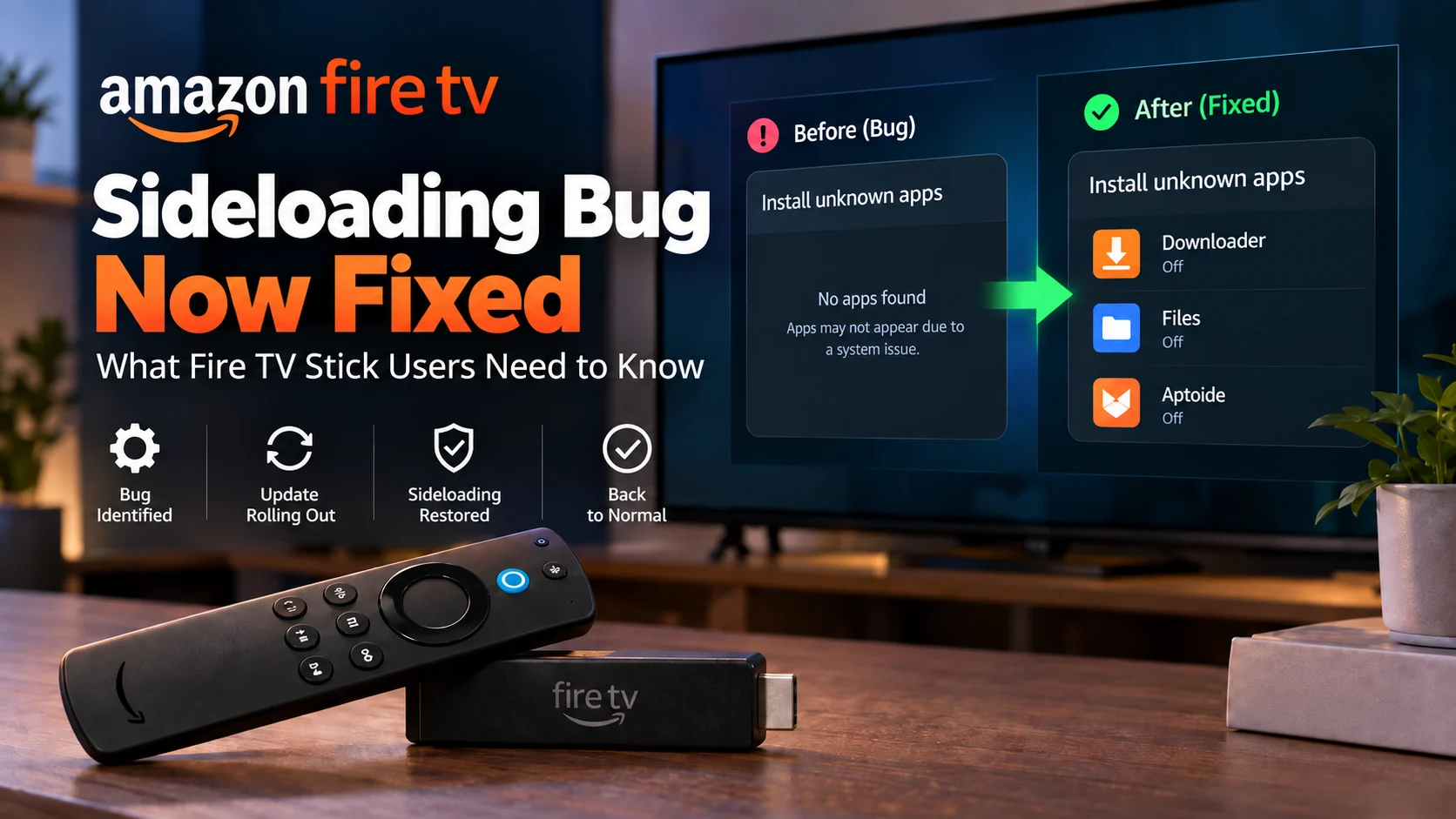
Over the past several weeks, Fire TV owners began reporting that apps such as Downloader were missing from the “Install unknown apps” menu. Without appearing in that list, an app could not be granted permission to install an Android APK, effectively preventing the normal sideloading workflow on affected devices.
The timing immediately raised questions about Amazon’s broader Fire TV strategy. Newer Fire TV Stick models are moving to Vega OS, which does not support traditional Android APK sideloading in the same way as Android-based Fire OS devices.
However, Amazon has now confirmed that the missing permission list on affected Fire OS hardware was caused by a bug in a recent Fire TV Settings update. The company says it identified the cause and is rolling out a Settings update that installs automatically on affected devices.
Reports on September 16 indicate that the repair has already started reaching users, although the rollout is staged and may not appear on every device at the same time.
So what exactly happened, which Fire TV Sticks are affected, and what does the fix mean for the future of sideloading?
What Happened to Sideloading on Fire TV?
The issue centered on the Install unknown apps section found within Fire TV’s developer settings.
On Android-based Fire OS devices, this menu controls which installed applications are allowed to initiate the installation of apps from outside Amazon’s official App Store.
For example, a user might have Downloader installed normally from Amazon’s store. If they later wanted Downloader to open and install an APK obtained from another legitimate source, Downloader would first need to appear in the Install unknown apps menu so that permission could be enabled.
The bug caused that list to appear incomplete or empty on some Fire TV devices.
As a result, Downloader and similar applications could remain installed but could no longer be granted permission to install another app.
Amazon has now confirmed that this behavior was unintentional.
The company told AFTVnews that a recent Fire TV Settings update introduced the problem and that an automatic update would correct it.
Fire TV Sideloading Bug: Before and After the Fix
| Area | During the Bug | After the Fix |
|---|---|---|
| Downloader app | Could remain installed | Remains installed |
| “Install unknown apps” list | Could appear incomplete or empty | Eligible apps should appear again |
| Permission to install APKs | Could not be enabled for missing apps | Can be enabled again on supported Fire OS devices |
| Already-installed third-party apps | Not necessarily affected | No major change expected |
| Cause | Fire TV Settings software bug | Corrected through Settings/component update |
| User action | Some users unable to grant permission | Update should install automatically |
| Vega OS devices | Separate platform limitation | Traditional Android APK sideloading still does not apply |
The most important distinction is that the bug affected the permission interface, rather than proving Amazon had remotely disabled every previously installed third-party application.
Amazon Says It Was a Bug, Not a New Ban
The biggest question surrounding the issue was whether Amazon had intentionally removed sideloading.
That concern was understandable.
Amazon has already begun transitioning future Fire TV Stick hardware away from Android-based Fire OS toward Vega OS, its newer Linux-based platform.
Vega-powered devices do not provide the same traditional Android APK installation model, so when Fire OS users suddenly saw Downloader disappear from the permission menu, many assumed Amazon had started extending the same restriction to older devices.
Amazon says that was not the case.
According to the company, the incomplete Install Unknown Apps list resulted from a software defect in a recent Settings update. The company identified the cause and said a fix would roll out automatically to affected hardware.
This means Android-based Fire TV hardware that normally supports this feature is expected to regain the missing permission controls.
It does not, however, mean Amazon has changed the design of Vega OS.
The Fix Has Started Reaching Fire TV Devices
Amazon originally said the repair would be deployed over the following week.
By September 16, AFTVnews was reporting that Amazon had fixed the issue, and user reports began appearing from devices receiving a system component update that restored Downloader to the Install unknown apps list.
That component-update detail is important.
Fire TV owners should not necessarily expect their main Fire OS version number to change after receiving the repair.
Because the affected functionality belongs to Fire TV Settings, Amazon can potentially update that component separately from a major operating-system release.
This means a device may receive the fix even though its visible Fire OS version appears unchanged.
How Do You Check for the Fire TV Fix?
Amazon says affected devices should receive the repair automatically, so most users should not need to manually install anything.
If the issue is still present, users can check whether a new update is available by opening:
Settings → My Fire TV → About → Check for Updates
Android Authority notes that the fix may appear as a component update rather than a complete Fire OS upgrade.
After the update has installed, users who previously had an eligible app missing can revisit:
Settings → My Fire TV → Developer Options → Install unknown apps
On a corrected device, compatible installed applications that request the permission should once again appear in the list.
Because Amazon is using a staged rollout, the update may reach different Fire TV models at different times.
Which Fire TV Versions Were Affected?
The bug did not affect every Fire TV device.
Reports around the original issue primarily pointed toward some hardware running recent versions of Fire OS 7 and Fire OS 8. Testing published during the problem included affected builds such as Fire OS 7.7.1.6 and Fire OS 8.1.8.2.
Even among those versions, behavior was not completely consistent.
Some users could still see the expected applications in the Install unknown apps list, while others saw a partial list or no compatible applications at all.
That inconsistency was one of the clues that the problem could be a software bug rather than a universal platform-level restriction.
A deliberate policy change would normally be expected to behave more consistently across supported devices.
What About Apps That Were Already Installed?
The bug primarily affected the ability to grant installation permission to another app.
That is different from blocking every third-party application already installed on the Fire TV.
If an app had already been sideloaded before the problem appeared, the missing permission menu did not automatically mean that app would stop launching.
Similarly, if Downloader was already authorized before the Settings bug occurred, behavior could differ from a device where the permission had never been granted.
Amazon’s statement specifically focuses on the Install unknown apps list and does not describe a universal shutdown of previously installed applications.
That distinction helps explain why user reports varied so widely.
Does Amazon Still Officially Support Sideloading on Fire OS?
From a developer perspective, yes.
Amazon’s current Fire TV developer documentation still explains how developers can install and run their own Android applications on compatible Fire TV devices using Android Debug Bridge, or ADB.
Amazon itself describes installing an application outside the Appstore during development as sideloading.
That documentation supports Amazon’s explanation that app installation outside the store has not suddenly been eliminated from the Fire OS development environment.
However, users should still distinguish between software testing on Fire OS and Amazon’s newer Vega ecosystem. Those are becoming increasingly different platforms.
Fire OS and Vega OS Are Now Important to Tell Apart
The sideloading fix does not mean every new Fire TV Stick will support Android APK installation. That is one of the most important details of this story. Traditional Fire TV sticks use Fire OS, which is based on Android.
Amazon’s newer Fire TV Stick 4K Select and 2026 Fire TV Stick HD use Vega OS instead. Vega uses a different application architecture and does not provide the familiar Android APK installation path available on compatible Fire OS devices.
So two things can be true at the same time:
Amazon is restoring sideloading controls that were accidentally broken on existing Fire OS devices while also moving future Fire TV Stick hardware toward a platform where traditional Android sideloading is no longer part of the consumer experience.
This is why checking the operating system has become increasingly important when buying a Fire TV Stick.
Why This Bug Caused So Much Confusion
The reaction was amplified by timing. If this bug had happened several years ago, most users probably would have treated it simply as a Fire TV software problem.
In 2026, however, Amazon is actively moving away from Android on future Fire TV Sticks. That made a missing Install Unknown Apps menu look much more significant than an ordinary interface bug.
Amazon also increasingly controls how software is distributed across its newer devices, which has made advanced Fire TV users more sensitive to changes involving app installation.
The confirmed repair therefore matters beyond fixing one settings page. It clarifies that the issue seen on affected Fire OS devices was not intended to retroactively make those products behave like Vega OS hardware.
What Does This Mean for Fire TV Stick Owners?
For owners of compatible Android-based Fire OS devices, the immediate news is positive. If Downloader or another eligible installer disappeared from the Install unknown apps list because of this bug, Amazon’s Settings update is designed to restore that functionality.
If the permission list still looks incorrect, the most practical approach is to make sure the device is online, check for Fire TV updates, and allow Amazon’s staged rollout to reach the device.
Users do not need to factory reset their Fire TV simply because the permission list is temporarily missing. And there is little reason to replace working Fire TV hardware solely because of this specific bug.
The bigger long-term consideration applies when purchasing a future Fire TV Stick. Users who specifically require Android compatibility should check whether a model runs Fire OS or Vega OS before buying it.
Sideloading Still Comes With Security Responsibilities
Restoring the permission does not make every external application safe. Applications distributed outside an official app marketplace may not receive the same review or automated security checks as software obtained through the device’s normal store.
Users should only install software from developers and sources they trust and should avoid downloading unknown packages simply because a website claims they provide extra functionality.
Keeping Fire TV software updated is also important, because updates can include security patches and fixes beyond this particular settings issue.
For developers, Amazon’s own ADB workflow remains the most clearly documented route for testing applications on compatible Fire OS hardware.
What the Fix Tells Us About the Future of Fire TV
This episode highlights an increasingly complicated period for Amazon’s streaming platform. Fire TV is no longer based on a single operating-system strategy.
Millions of existing devices remain on Android-based Fire OS, while Amazon is introducing Vega-powered hardware and has said future Fire TV Sticks will move in that direction.
That means features users once assumed were universal across the Fire TV family may increasingly depend on the specific device generation.
App compatibility, development workflows, sideloading, operating-system updates, and even certain UI capabilities can vary between Fire OS and Vega hardware.
For users and developers alike, the model name alone is no longer enough. The operating system underneath the Fire TV experience matters.
Final Thoughts
The Fire TV sideloading bug created understandable concern because it appeared at the same time Amazon is moving future Fire TV Stick hardware toward Vega OS. But Amazon has now clarified the situation.
The missing Downloader and Install unknown apps entries on affected Fire OS devices were caused by a Fire TV Settings bug, not a deliberate new sideloading restriction, and a fix is now rolling out.
For existing Fire OS owners, that means the familiar permission controls should return as the repair reaches their device. The bigger story, however, remains Amazon’s platform transition.
Existing Android-based Fire TV hardware and future Vega-powered Fire TV Sticks are increasingly two different software ecosystems. Users who care about Android application compatibility should therefore pay closer attention to the operating system when comparing future devices.
For now, though, Fire TV users affected by this specific bug can treat it as exactly what Amazon says it is: a software problem being repaired, rather than the sudden end of sideloading on existing compatible Fire OS hardware.
FAQs About the Fire TV Sideloading Bug
1) Did Amazon intentionally block sideloading on Fire TV?
Amazon says no in this case. The company confirmed that a bug in a recent Fire TV Settings update caused the Install unknown apps list to appear incomplete or empty on some Fire TV devices.
2) Has the Fire TV sideloading bug been fixed?
The fix has begun rolling out. Amazon said it would install automatically on affected devices over the following week, and reports from September 16 indicate that corrected component updates have started reaching users.
3) Why did Downloader disappear from Install Unknown Apps?
The recent Settings bug prevented Fire TV from correctly displaying some applications that were eligible to request installation permission. Downloader was one of the apps users commonly reported missing.
4) How can I check for the fix?
Go to Settings → My Fire TV → About → Check for Updates. The correction may arrive as a Fire TV component update, so the main Fire OS version may not necessarily change.
5) Does the fix apply to Vega OS Fire TV Sticks?
No. The current issue involves the Android-based Fire OS permission system. Vega OS uses a different application model and does not gain traditional Android APK sideloading from this fix.
6) Does Fire OS still support developer app installation?
Yes. Amazon’s developer documentation continues to provide instructions for installing Android applications on compatible Fire TV hardware through ADB for development and testing.
7) Do I need to factory reset my Fire TV?
Amazon has not said a factory reset is required. The company’s repair is being distributed as a software update and is intended to install automatically on affected devices.
Stay Updated with the Player SDK Guide Hub
Fire TV is evolving quickly, and software changes like this can directly affect users, streaming developers, and app teams. That’s why we created the Player SDK Guide Hub.
The Player SDK Guide Hub covers the latest Fire TV, Google TV, Roku, Apple TV, Android TV, Kodi, Plex, VLC, media player, and streaming device updates, including operating system changes, app compatibility, software bugs, new hardware, playback features, device specifications, and developer-focused platform news.
Whether Amazon releases another Fire TV fix, expands Vega OS to additional hardware, changes app-development requirements, or launches a new streaming device, our Guide Hub helps explain what changed, which devices are affected, why it matters, and what streaming teams should watch next.
Explore the Player SDK Guide Hub for the latest Fire TV news, streaming-device updates, technical guides, media-player developments, and platform insights.
