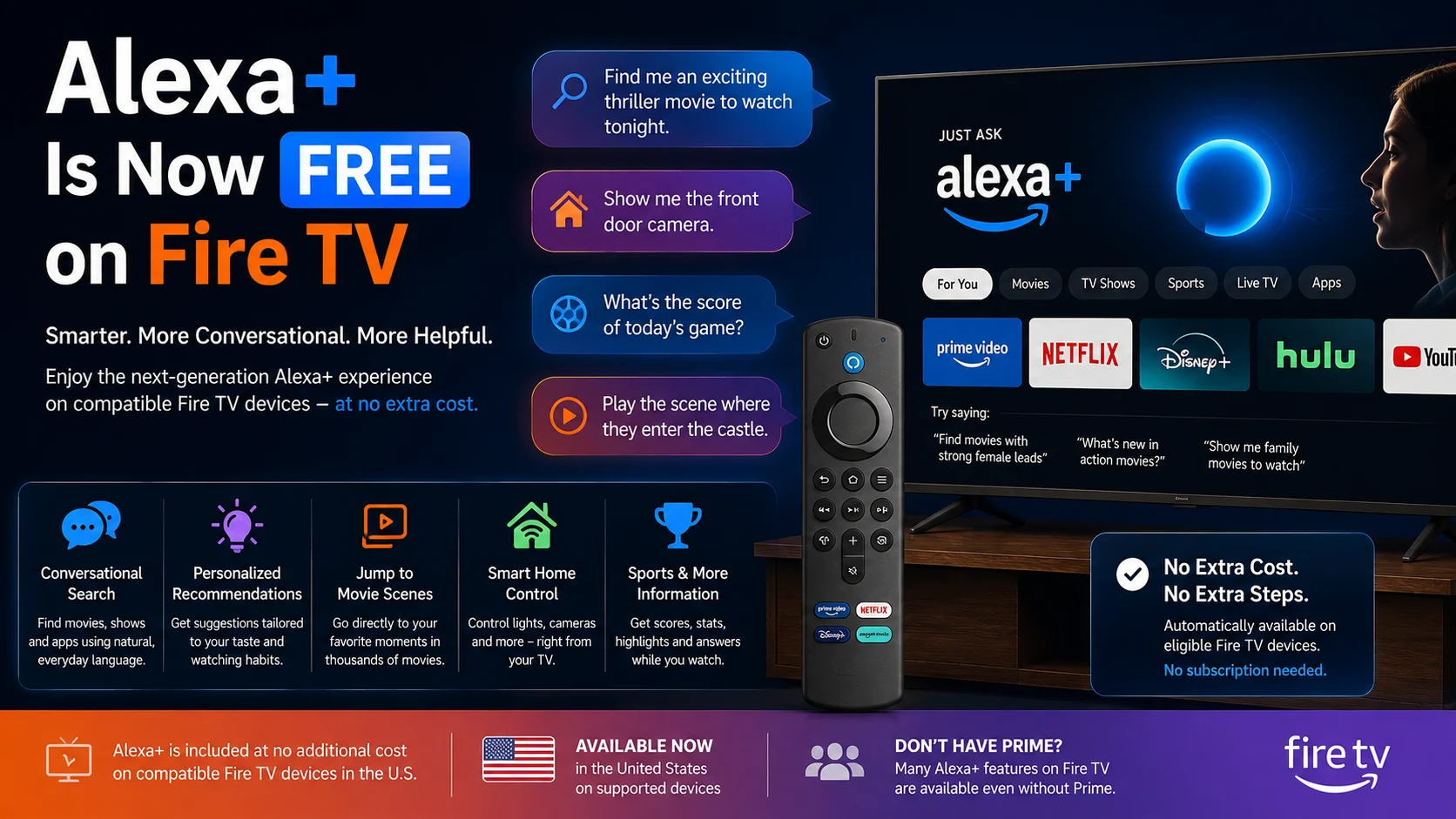
Amazon is making its generative AI-powered Alexa+ experience available on compatible Fire TV devices at no additional cost, significantly expanding access to its next-generation voice assistant.
The rollout began for all eligible customers in the United States on August 19, 2026, and one important detail: users do not need an Amazon Prime membership to access many Alexa+ features directly through a compatible Fire TV. Eligible devices are automatically upgraded, with no separate app, subscription activation, or manual installation required.
This makes Alexa+ much more than a premium add-on for Fire TV. Amazon is increasingly positioning the assistant as part of the core television experience, helping viewers search for content conversationally, receive personalized recommendations, ask follow-up questions, control connected smart-home devices, check sports information, and interact with their TV without navigating through multiple menus.
For millions of Fire TV users, that could change one of the most common parts of streaming: deciding what to watch.
What Is Alexa+ on Fire TV?
Alexa+ is Amazon's next-generation AI assistant powered by generative AI.
Unlike classic Alexa, which was largely built around relatively structured voice commands, Alexa+ is designed to understand more natural conversations, context, incomplete thoughts, and follow-up questions.
Amazon says Alexa+ can maintain conversational context, understand user preferences, and provide more personalized responses. The broader Alexa+ platform uses large language models through Amazon Bedrock alongside Amazon's existing services and integrations.
On Fire TV, Amazon is focusing these capabilities heavily around entertainment.
Instead of remembering an exact movie title, users can describe what they want to watch. Alexa+ can interpret factors such as genre, mood, actors, directors, previous viewing preferences, or who is watching with them and use that information to suggest content.
Amazon says customers are already talking to Alexa+ on Fire TV nearly twice as much as they interacted with the original Alexa, suggesting conversational search is becoming an increasingly important part of the Fire TV experience.
Is Alexa+ Really Free on Fire TV?
Yes, but there is an important distinction.
Amazon is providing access to many Alexa+ features at no additional cost on compatible Fire TV devices in the United States, whether or not the customer has Prime.
Eligible Fire TV owners do not need to sign up for a separate Alexa+ subscription. Amazon says the upgrade happens automatically on supported hardware.
However, this does not mean every Alexa+ capability across every Amazon device is completely free.
Amazon's broader Alexa+ service costs $19.99 per month and is included with an Amazon Prime membership. Prime members or customers using the Alexa+ Standard Plan can also receive additional functionality on Fire TV and use Alexa+ on compatible Echo hardware.
In other words, Fire TV now provides a substantial Alexa+ experience without requiring Prime, while Amazon still reserves some expanded features and cross-device capabilities for Prime or Alexa+ plan customers.
Alexa+ Free Fire TV Access vs. Full Alexa+ Features
| Features | Alexa+ on Eligible Fire TV at No Extra Cost | Prime /Alexa +Standard plan |
|---|---|---|
| Conversational entertainment search | Yes | Yes |
| Personalized recommendations | Yes | Yes |
| Follow-up questions and contextual conversation | Yes | Yes |
| Basic smart-home voice controls | Yes | Yes |
| Live compatible camera feeds | Yes | Yes |
| Alexa personality options | Yes | Yes |
| Alexa+ on compatible Echo devices | Not included through free Fire TV access alone | Included |
| Alexa Routines | Limited / additional plan required | Available |
| Specific Ring camera moments | Additional plan required | Available |
| Advanced Home Modes | Additional plan required | Available |
Amazon specifically lists Alexa Routines, access to specific Ring camera moments, advanced Home Modes, and broader Alexa+ availability on compatible Echo devices among the benefits available through Prime membership or an Alexa+ Standard Plan.
Fire TV Search Becomes More Conversational
The biggest day-to-day change may be how users search for movies and shows.
Traditional voice search works best when users already know what they want. Someone might say the title of a movie, an actor's name, or the name of a streaming application.
Alexa+ is designed for situations where the user does not have an exact title in mind.
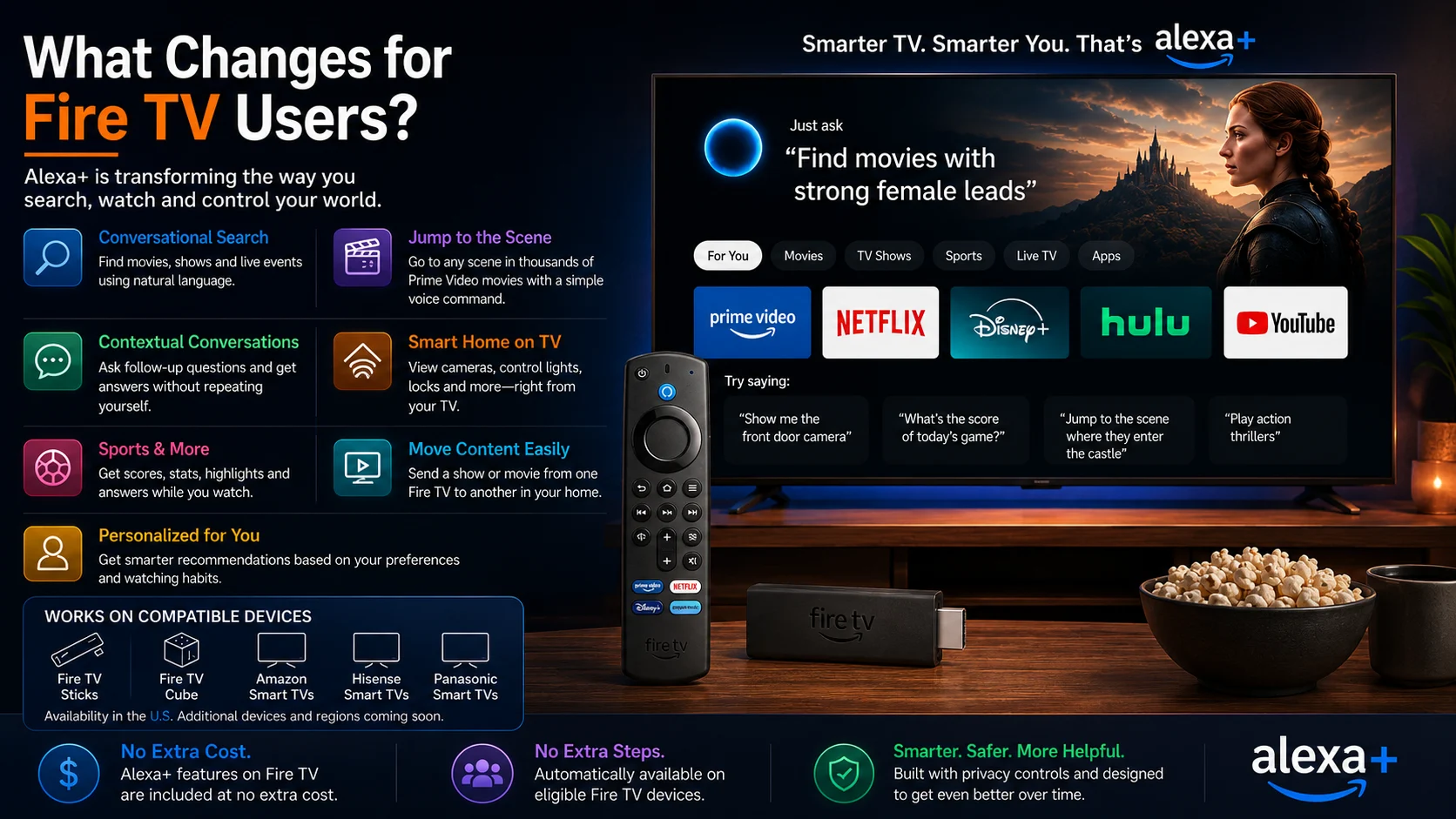
For example, Amazon suggests users can request historical dramas with strong female leads or describe the mood, genre, actor, or type of story they want to watch. Alexa+ can then interpret the request rather than forcing the user to browse through categories manually.
This could be especially useful for households using several streaming services.
Amazon's broader Fire TV redesign organizes movies, TV shows, sports, news, and live programming across a user's subscriptions, while Alexa+ sits throughout that interface as an AI-powered discovery layer.
The result is a shift from traditional keyword search toward intent-based content discovery.
Alexa+ Can Remember the Context of Your Conversation
Another meaningful improvement is conversational context.
With traditional assistants, users often need to repeat names or details with every new command. Alexa+ is designed to understand that a follow-up question relates to what was previously discussed.
Amazon provides an example where a user can ask about an actor's filmography and then immediately ask whether that same person is currently touring without repeating the actor's name.
That may sound like a small improvement, but it makes television voice interaction feel significantly less mechanical.
Instead of issuing individual commands, users can have a continuing conversation about the show, movie, actor, sporting event, or topic currently on screen.
Alexa+ can also maintain context across other Alexa+ endpoints. Amazon says conversations can begin on an Echo device or Fire TV and continue later through a phone, car, or computer where Alexa+ is available.
You Can Jump Directly to Specific Movie Scenes
One of Alexa+'s more distinctive Fire TV capabilities is the ability to jump directly to a movie scene by describing it.
Rather than manually moving through the timeline, a user can describe the moment they want to watch, and Alexa+ can take them to that section of a supported Prime Video movie.
Amazon says the technology works with thousands of Prime Video movie titles and tens of thousands of indexed scenes, using descriptions, character references, and recognizable dialogue or moments to identify the correct location.
The supported title must either be included with Prime Video or be a movie the user has purchased or rented through Prime Video.
Amazon has also said it plans to expand the capability to more scenes and eventually television shows.
This is an example of how generative AI could change video navigation itself rather than simply improving recommendations.
Alexa+ Becomes a Companion While You're Watching
Alexa+ is not limited to helping users choose what to watch.
Amazon is increasingly positioning it as a companion that remains useful after playback starts.
Users can ask about an actor appearing on screen, learn more about a movie, ask questions about a soundtrack, or get background information without leaving the TV experience to search on a phone.
Sports viewers can also request scores, player statistics, highlights, and other information related to live events. Amazon says Alexa+ can help users locate live events across supported services and answer questions about teams or individual players while they watch.
For Fire TV, this moves voice assistance beyond simple commands such as play, pause, or open an app.
The television becomes an interactive source of contextual information about whatever is currently being watched.
Moving Prime Video Between Fire TV Devices Gets Easier
Alexa+ also introduces more natural multi-device controls.
Amazon says users can move a Prime Video title from one Fire TV device to another using a simple voice command.
For example, someone watching in the living room could ask Alexa+ to move the show to the Fire TV in their bedroom.
That type of feature becomes increasingly useful in households with multiple Fire TV Sticks or televisions using Fire TV built in.
It also demonstrates Amazon's broader goal for Alexa+: the assistant should understand what the user wants to accomplish rather than requiring the person to navigate device menus manually.
Fire TV Is Becoming a Smart-Home Control Center
Entertainment is only part of the Alexa+ Fire TV update.
Compatible televisions can increasingly act as a visual control center for connected smart-home devices.
Users can ask Alexa+ to display a compatible Ring camera feed directly on the television, adjust connected lights for movie night, or control compatible smart locks.
Amazon gives examples such as asking Alexa to show the front door, dim the room, or lock a connected door.
The redesigned Fire TV interface also includes quicker access to Ring cameras and smart-home management through a shortcut panel available by long-pressing the remote's Home button.
For customers already invested in Alexa-compatible smart-home hardware, this makes Fire TV increasingly useful even when they are not actively browsing for something to watch.
Which Fire TV Devices Support Free Alexa+?
The current no-additional-cost rollout is for U.S. customers using compatible Fire TV hardware.
Amazon says supported devices include all current-generation Amazon Fire TV Sticks, Fire TV Cube, Amazon Ember smart TVs, and selected smart TVs from partners including Hisense and Panasonic that have Alexa+ built in.
Amazon says additional devices and regions may be added over time.
That regional limitation is important. The August 19 announcement specifically covers the U.S., so Fire TV owners elsewhere should not assume the same no-cost Alexa+ rollout is already available in their country.
Alexa+ itself has expanded internationally, but feature availability varies by region.
Do Fire TV Users Need to Install Anything?
No.
For eligible devices in the U.S., Amazon says there is no app to download and no subscription to activate.
Supported customers are automatically upgraded from the previous Alexa experience to Alexa+.
Users can therefore continue interacting with Fire TV in the same general way they already use Alexa, but supported requests can now use Alexa+'s more conversational and context-aware capabilities.
This automatic rollout also means Amazon can introduce AI functionality to a large existing device base without requiring customers to purchase entirely new streaming hardware.
Alexa+ Fits Into Amazon's Bigger Fire TV Redesign
The Alexa+ rollout is arriving during a broader transformation of Fire TV.
Amazon redesigned the Fire TV interface in 2026 with updated navigation, improved layouts, faster underlying code, better organization across content categories, and easier access to applications.
Amazon says the redesigned interface can deliver 20% to 30% performance gains in some cases on existing devices and is now available globally on current-generation Fire TV Sticks, Fire TV Cube, and supported Amazon smart TVs.
Alexa+ has been integrated throughout that experience.
Users can search conversationally, add titles to watchlists, request sports information, control their smart home, view photos, and access other AI-assisted functionality through voice.
Taken together, Amazon is clearly moving Fire TV beyond being simply an application launcher.
What Does Alexa+ Mean for Fire TV Users?
For users who rarely use voice commands, the Fire TV experience can still work much as it did before.
But for those who frequently struggle to decide what to watch, Alexa+ could make voice interaction considerably more useful.
The main improvement is not simply that Alexa can answer more questions. It is that Fire TV can better interpret intent.
A viewer can describe a mood instead of a title, ask a follow-up question without repeating the subject, control smart-home hardware while watching television, or request information related to content already on screen.
That represents a broader shift in streaming-device interfaces: AI may increasingly sit between the viewer and a growing number of streaming applications, helping users navigate content without manually opening and searching each service.
Final Thoughts
Making Alexa+ available on Fire TV at no additional cost is a significant step in Amazon's effort to make generative AI part of everyday television use.
Instead of limiting Alexa+ to Prime subscribers or dedicated Echo devices, Amazon is placing many of its AI-powered capabilities directly into compatible Fire TV hardware already sitting in customers' living rooms.
The most meaningful change is likely to be content discovery. Natural-language recommendations, contextual follow-up questions, scene search, sports information, and personalized suggestions could reduce the amount of time viewers spend manually browsing streaming apps.
Smart-home integration adds another dimension, turning the TV into an increasingly capable connected-home interface.
Not every Alexa+ feature is included for free, and the current rollout is specifically focused on eligible U.S. Fire TV customers. But the direction is clear: Amazon increasingly sees AI as a core part of the Fire TV experience rather than an optional voice-search feature.
FAQs About Alexa+ on Fire TV
1) Is Alexa+ free on Fire TV?
Alexa+ is available at no additional cost for eligible U.S. customers on compatible Fire TV devices, even without an Amazon Prime membership. Some advanced features still require Prime or an Alexa+ Standard Plan.
2) Do I need Prime to use Alexa+ on Fire TV?
No. The new Fire TV access announced in August 2026 does not require Prime for many core Alexa+ features. Prime adds broader Alexa+ access and additional Fire TV functionality.
3) Which Fire TV devices support Alexa+?
Amazon currently lists all current-generation Fire TV Sticks, Fire TV Cube, Amazon Ember smart TVs, and selected Hisense and Panasonic televisions with Alexa+ built in as part of the U.S. rollout.
4) Do I need to download Alexa+?
No. Eligible Fire TV customers are automatically upgraded. Amazon says there is no app to download or separate subscription activation required for the included Fire TV experience.
5) Can Alexa+ control smart-home devices from Fire TV?
Yes. Supported users can view compatible Ring cameras and control devices such as connected lights and smart locks through Fire TV voice commands
6) Can Alexa+ find a specific movie scene?
Yes, for supported Prime Video movies. Amazon says the feature can identify and jump to tens of thousands of indexed scenes across thousands of eligible movies based on the user's description.
7) Is free Alexa+ on Fire TV available worldwide?
Not yet. Amazon's August 19, 2026, announcement specifically covers eligible customers in the United States. Amazon says additional devices and regions may be supported over time.
Stay Updated with the Player SDK Guide Hub
Streaming devices are changing rapidly as AI assistants, operating systems, hardware capabilities, playback technologies, and application ecosystems continue to evolve. That's why we created the Player SDK Guide Hub.
The Player SDK Guide Hub covers the latest Fire TV, Google TV, Android TV, Roku, Apple TV, media player, and streaming device updates, including new hardware launches, AI features, operating system changes, device specifications, platform developments, and other news that can affect streaming applications.
Whether Amazon expands Alexa+ to more Fire TV devices, Google introduces new AI-powered TV features, Roku updates its platform, or another streaming device receives a major software change, our Guide Hub helps explain what changed, which devices are affected, why it matters, and what developers and streaming teams should watch next.
Explore the Player SDK Guide Hub for the latest streaming-device news, platform updates, technical guides, and media technology insights.
